About the Substance Attributes
Material Editor > Create/Convert > Create Material > Substance
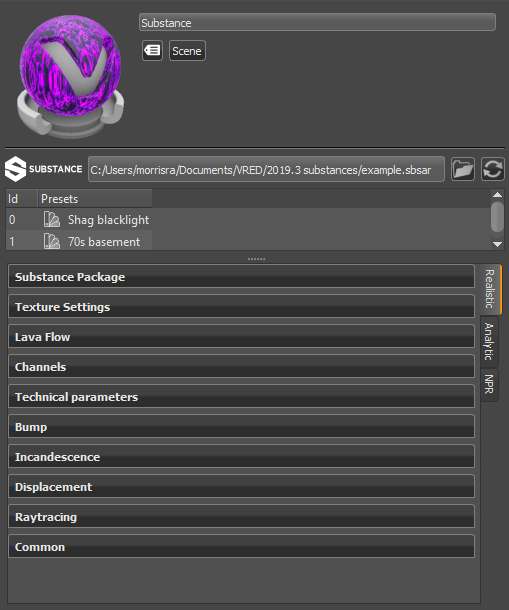
The Substance Attributes
The top part of the Substance Attributes displays a Material Preview and the following additional information:
- Substance Name - Provides the name and location of the Substance.
 Load - Opens the Load Substance Archive dialog for locating a Substance. By default, it opens to the last opened directory.
 Reload - Reloads the Substance archive file.
IMPORTANT Any previous changes made to the material are lost, including presets.
Id - Identifies the listed presets with a numeric value.
Presets - Displays the name of the listed Substance presets.
- Double-click LMB to apply the preset.
- Double-click MMB to apply the preset AND set the default output size.
Substance Parameters
This next section houses parameters. Most substances will have Substance Package, Texture Settings, Bump, Displacement, Raytracing, and Common parameter categories, along with their own unique categories of parameters.
Supported Texture Channels
Here is a list of the supported Substance output channels:
- Base Color (Required)
- Roughness (Required)
- Metallic (Required)
- Normal (Optional) - VRED expects the normal texture to be generated in DirectX normal format (i.e., +X = right and +Y = down).
- Height (Optional)
- Emissive (Optional)
- Opacity (Optional)
- Specular Level (Optional)
- Ambient Occlusion (Optional)
- Anisotropy Level and Anisotropy Angle (Optional) - VRED uses the anisotropy angle for a clockwise rotation.
Here is a list of Texture Channels that are not easily found in VRED:
- Normal is found in Bump (Bump Intensity). Tangent-space Normal mapping is used. Bump Intensity is set to 1.0 by default to enable normals. When Bump Intensity is set to 0.0, Normal mapping is disabled.
- Height is found in Displacement. By default, Displacement mapping is disabled (Displacement Height is set to 0). To displace the geometry, based on the content of the height texture, set Displacement Height to a value greater than 0. The Displacement Offset defines the texture values used to extrude (values larger than Offset) or indent (values smaller than Offset) the geometry.
Height is also found in Bump (Parallax Intensity + Bump Type). Instead of using Displacement mapping, a method called Parallax Mapping is used to create the impression of a displaced surface.
Parallax mapping is faster than real displacement mapping; however, it does not generate the correct silhouettes and might display artifacts. By default, Parallax Mapping is disabled (Parallax Intensity is set to 0.0). Bump Type controls use the Parallax Mapping method. For example, the Bump Type, Bump Mapping, enables standard Parallax Mapping and Displacement Mapping enables Parallax Occlusion Mapping.
- Emissive is found in Incandescence. If a material has an emissive texture, the Incandescence Intensity will be set to 1.0 by default.
- Opacity is found in Transparency. The Use Cutout option will be enabled by default.
Substance Package Parameters
The following list is comprised of parameters we feel are notable:
Graph - Specifies the graph used by the Substance. Each graph can change the look and makeup of a Substance. Click the drop-down and select a graph.
- Reset - Resets the current selected graph to its default parameters. However, any VRED material setting changes made to Texture Settings, Bump, Incandescence, Displacement, Transparency, Raytracing, or Common will remain. See Resetting a Graph in Working with Substances.
Output Size - Sets the rendering output resolution for each Substance material. For a Substance that contains multiple materials, you can set some materials to a lower resolution, and others to a higher one. Doing this, enables you to control memory usage and reduce rendering time. Use the Lock feature to lock in the output size.
Random Seed - Randomizes the texture patterns within the Substance, based on the numeric value entered.

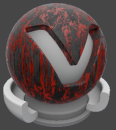
For the first image, Random Seed = 0. For the second, it is 30. Notice the difference in the texture pattern.
Texture Settings
The following are a list of the parameters:
Mapping Type - Sets how the Substance is mapped onto your geometry. Choose from UV, Planar, and Triplanar. Use this in combination with other Texture Settings such as Repeat Mode UV, and Texture Size to adjust your Substance to the geometry.
Repeat Mode UV - Sets the repeat mode of the texture.
Use Texture Size - Defines texture size in millimeters instead of repeat values for texture mapping.
Repeat UV - Sets the repeat mode for the U and V-axis of the texture.
Offset UV - Sets an offset for the UVs.
Rotate - Rotates the UVs.
Bump
The following are a list of the parameters:
Parallax Intensity - Controls the degree of motion parallax applied to the substance.
Bump Intensity - Sets the prominence of the bumps of the substance. High intensity results in very prominent or high bumps.
Bump Type - Applies the chosen mapping setting to the substance, either bump or displacement mapping.
Surface Structure -
Structure Size -
Bump Affects Specular Reflections -
Rounded Edges
For more information on the rounded edges parameters and how to use them, see Rounded Edges Shader.
Mode - Sets how edges are smoothed. There are four options:
Off - No edge rounding; therefore, all other parameters are disabled.
Same Geometry - Only rounds edges belonging to the same geometry or shell.
Same Material - Only rounds edges between objects with the same material.
Same Group - Only rounds edges between materials with the same group ID. This can be useful for an eyeball and lid, where there are different materials, yet you want a smooth edge between them to catch the highlight.
Group - Available only when the Mode, Same Group, is chosen. Sets the group ID for smoothing.
Type - Sets the type of edges rounded. There are three options:
Convex & Concave - Both convex and concave edges are rounded.
Convex only - Only convex edges are rounded. This speeds up calculations when there are only convex edges.
Concave only - Only concave edges are rounded. This speeds up calculations when there are only concave edges.
Radius - Sets the radius for rounded edges in world space.
Chamfer - Gives the edge a more chamfered appearance, instead of a perfectly round shape.
Angle Limit - Limits the rounding effect to edges with an angle above the given limit. If the angle between the current shading normal and adjoining faces is less than the angle limit, the edge is not smoothed.

Use this limit to avoid the effect on edges already smoothed by the interpolation of the shading normals.

Quality - Sets the number of rays used to evaluate the nearest edges. Each quality level represents a multiple of 4 samples for estimating either convex or concave edges.
A quality level of 1 will trace 4 rays to estimate convex edges and 4 rays to estimate concave edges. At quality level 1, the effect is also only evaluated for non-distributed rays, not rays originating from diffuse or glossy brdfs. At higher quality levels, the effect is evaluated for one additional bounce.
Raytracing
The following are a list of the parameters:
Material ID - Sets the ID of the material.
Line Tube Radius - Defines the radius of the tube when the substance is applied to a line geometry.
Use Local Environment - Calculates the diffuse and glossy reflections from the environment assigned to this substance in all illumination modes.
Ignore Photon Map - Ignores the light values of a photon map when calculating the illumination of a pixel.
Override Illumination Mode - Overrides the global set illumination modes for interactive or still frame rendering.
Override IBL Sampling Quality - Overrides the global IBL sampling quality for sampling the environment map during interactive or still frame rendering.
Override Reflection/Refraction Sampling Quality - Overrides the global sampling quality for reflections and refractions during interactive or still frame rendering.
Override Trace Depth - Overrides the global set trace depth modes for interactive or still-frame rendering.
Incandescence
- Ground Shadow Intensity - Sets the shadow intensity of the generated lightsources on the shadow material.
Transparency
- Invert Texture - Inverts the transparency, making opaque areas transparent and vice versa.
Displacement
The following is a list of the parameters:
Displacement Height - Defines the scaling factor of values for the displacement.
Displacement Offset - Defines the offset of the displacement. Allows you to set the value of the zero plane in the texture. Values below the zero plane displace inside the geometry and values above the zero plane displace outside the geometry.
Use Accurate Silhouettes in OpenGL - Allows you to calculate the displacement in OpenGL like in raytracing mode. Selecting it may drastically reduce the performance.
Environment
The following are a list of the parameters:
Environment - States the HDR used for the environment.
Environment Geometry - Defines the shape of the environment hull.
Load Geometry - Loads a custom file as environment geometry.
Is Visible - Toggles the visiblity of the environment.
Flip Inside Out -
Shadow Plane Visible - Toggles the visibility of the shadow plane on the ground.
Environment Transformation
The following are a list of the parameters:
Size - Sets the projection size. Textures default to infinite projection depth and cover the entire object. The texture can be restricted to one side of the object by limiting the projection range. Change the projection size Z value from zero (infinite) to another value.
Center - Sets the x, y, and z coordinates for the center of the projection.
Center From Object - Adjusts the projection center to the center of the selected object.
Rotate - Sets the x, y, and z rotation for the projection plane.
Scale - Sets the x, y, and z scale factor for the projection plane.
Shadows and Illumination
The following are a list of the parameters:
Environment Color Correction
The following are a list of the parameters:
Exposure - Sets the exposure value.
White Balance - Sets the white balance value.
Saturation - Sets the saturation level.
Reflected Saturation - Sets the saturation levels of reflections.
Transformation
The following are a list of the parameters:
Environment Raytracing
The following are a list of the parameters:
Is Visible in Reflections - Toggles the visibility of the environment in reflections.
Use as Lightsource - Does not calculate diffuse or glossy illumination, when disabled. Only one visible environment should have this enabled; otherwise, VRED won't know which environment to use as a lightsource.
Use Accurate Geometry - Uses the real environment geometry, when enabled, for more accurate diffuse and glossy illumination in Precomputed+IBL and Full Global Illumination Mode (at the cost of a 20–25% performance hit compared to the default finite sphere environment). It is disabled by default, so all diffuse and glossy reflection calculations are based on the virtual sphere of the environment.
Emit Caustics - Enables the HDR to emit caustics. Only supported in Full Global Illumination Mode with caustics (Photon Tracing mode 'Caustics + Indirect').
Material ID - Sets the ID of the material.
Override IBL Sampling Quality - Overrides the global IBL sampling quality for sampling the environment map during interactive or still frame rendering.
Environment Shader
The following are a list of the parameters:
Shadow Lightsources - Specifies the lightsource to use for shadows.
Use Lightsources Only - Uses only the specified lightsources for casting environment shadows, when enabled.
Material Shadow intensity - Sets the intensity of the material shadows.
Ground Shadow Intensity - Sets the intensity of the ground shadows.
Map Filter Radius -
Map Resolution - Specifies the resolution used for the environment map.