See the section on Curves > Blend Curve Toolbox in the Alias online help for a full explanation of Blend Curves.
By default, CVs aren't displayed on a Blend Curve. Use Object Display Control to change the default so that CVs are always displayed, or just use the Control Panel to display and monitor CV positions.
Use the Auto Align at Surface Corners option in the Blend Crv Create option box to get good default alignment results
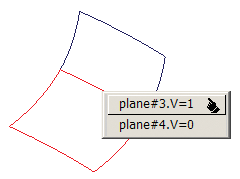
Because Blend Curves are associated with the surface, you need to specify which surface to attach them to. If you select a joint edge, the standard pick chooser appears, with a 'black finger' icon. You need to keep the mouse button pressed down, and drag the cursor to the black finger until it highlights. Keep holding the mouse button down and then drag along the edge to your chosen location.