Using the middle mouse button, you can drag any menu or palette tool onto any of the shelves in the Alias interface (Shelf, Control Panels, Marking Menus, Command Stepper).

Using shelves gives you the ability to have different versions of the same tool (each with different option settings).
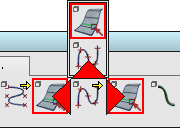
When an item is dragged onto the shelf, a red arrow appears showing you where it will be placed. Holding the cursor over the upper part of another icon draws an upward arrow, allowing you to create a cascading group of tools.
Preferences InterfaceShelf Extras provides spacers and dividers that you can drag onto a shelf to help visually separate tool groups.

Click the  icon on the shelf title bar to reveal the Shelf options. You can make new tabs to add to the current shelf set, save the shelf set, or load an existing shelf set. Shelf sets are saved in your UserPrefs2014 folder. They are also displayed at the bottom of the menu allowing you to switch between them.