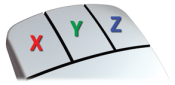
When working in a 3D view, the mouse buttons constrain motion in the x, y and z directions.
Note:
In an orthographic view, the mouse buttons switch to a drawing board motion of free/ horizontal/ vertical.
The lock options are a secondary tool: use them to prevent a CV moving in one direction in case the wrong mouse button is used.

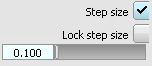
The Step Size setting is used in the same way as Mousewarp and Delta in ICEM. Use it to specify the increments using the keyboard arrows, and to adjust the influence of the mouse movements to make very fine adjustments.