Synopsis
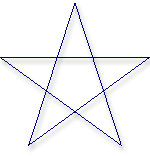
This design defines a polyline from a list of points. The polyline instance can be an open or a closed region. Closing the polyline can be accomplished by setting closed? to True or supplying the first point again at the end of pointList. The intersections of the line segments may be filleted by providing a fillet radius greater than zero or by providing a list of fillet radii - one radius for each intersection.
AcadPolyLine differs from the generic Polyline design. The main difference is that AcadPolylLine creates "polyline" objects in the AutoCAD database, where Polyline creates lines (and arcs, if fillets are requested).
Mixins
CurveMixin
InkStrokedMixin
BasePart
Canonicals
| Name | Type | Description |
|---|---|---|
| pointList | list | Specifies the points to be used in creating the polyline. |
Parameters
| Name | Type | Description |
|---|---|---|
| closed? | boolean | Specifies if the polyline forms a closed perimeter or not. The default value is False. |
| pointValues | list | Alternative specification which takes a list of pairs of coordinates {x1, y1, x2, y2, ...} |
| acadbulges | list | Bulge values for polylines with curved segments. |
Rules
| Name | Type | Description |
|---|---|---|
| NumCoords | integer | Computes the number of points defined in pointValues. |
| startPoint | point | First point in pointList. |
| endPoint | point | If value of closed? is True, then endPoint equals startPoint. If closed? is False, endPoint is the last point in pointList. |
| angles | list | Computed angles for the bulges. |
Methods
getangle_frombulge( bulge As Number ) As NumberMethod to turn the bulge into an included angle, as defined in the AutoCAD Help.
getradius_frombulge( p1 As Point, p2 As Point, bulge As Number ) As NumberMethod to get the radius of the arc this bulge value represents.
See Also: Polyline