Synopsis
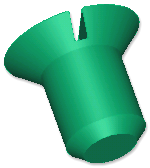
This design derives a new solid object from a Boolean operation on a list of input solid parts. It can find the solid that is the intersection, union or difference of an input list of parts.
Canonicals
| Name | Type | Description |
|---|---|---|
| components | list | A list of component solids on which the Boolean operation will be performed. The order of the list is important, as it is used to determine the order in which the operations should be performed. For example, {solid1,solid2,solid3} will perform the operation between solid1 and solid2, then between that new result and solid3. Only one type of operation can be performed on the list of solid parts. To add two solids and subtract a third, for example, use BooleanSolid once with a union to create an intermediate result and then again with a difference to produce the final result. |
Parameters
| Name | Type | Description |
|---|---|---|
| operation | name | Name of the operation to perform on the list of components. Values can be :Union, :Intersection, or :Difference. The default is :Union. :Difference finds the set of points that exist in the first solid, but not in the second. :Union finds the set of points that belongs to both the solids. :Intersection finds the set of points that exists in both the first and second solid parts. |
Example 1
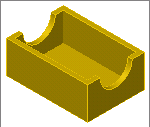
| Name: | BooleanSolid_Ex01 |
| Design: | acDrawingDocument |
| Child Name: | exterior | |
| Child Design: | :Block | |
| Name | Type | Supplied |
| height | number | 4 |
| length | number | 10 |
| width | number | 7 |
| Child Name: | interior | |
| Child Design: | :Block | |
| Name | Type | Supplied |
| height | number | exterior.height - 1/2 |
| length | number | exterior.length - 1 |
| width | number | exterior.width - 1 |
| fTop | point | exteriorfTop |
| Child Name: | recess | |
| Child Design: | :Cylinder | |
| Name | Type | Supplied |
| radius | number | 2 |
| bottomPoint | point | exterior.eTopRear |
| topPoint | point | exterior.eTopFront |
| Child Name: | result | |
| Child Design: | :BooleanSolid | |
| Name | Type | Supplied |
| components | list | {exterior, interior, recess} |
| operation | name | :Difference |
| color | string | "dandelion" |
Example 2
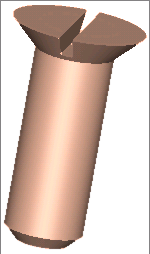
| Name: | BooleanSolid_Ex02 | |
| Design: | acDrawingDocument | |
| Name | Type | Formula |
| diameter | number | 3/16 |
| length | number | 0.5 |
| Child Name: | shank | |
| Child Design: | :Cylinder | |
| Name | Type | Supplied |
| height | number | Me.length |
| radius | number | me.diameter/2 |
| Child Name: | chamfer | |
| Child Design: | :Cone | |
| Name | Type | Supplied |
| height | number | Child.radius/3 |
| radius | number | shank.radius |
| topRadius | number | Child.height/2 |
| origin | point | shank.topPoint |
| yDirection | vector | -shank.yDirection |
| Child Name: | head | |
| Child Design: | :Cone | |
| Name | Type | Supplied |
| height | number | Child.radius |
| radius | number | shank.radius * 1.7 |
| topRadius | number | Child.height/2 |
| origin | point | shank.topPoint |
| yDirection | vector | -shank.yDirection |
| Child Name: | pin | |
| Child Design: | :BooleanSolid | |
| Name | Type | Supplied |
| components | list | {head, shank, chamfer} |
| Child Name: | slot | |
| Child Design: | :Block | |
| Name | Type | Supplied |
| height | number | head.radius / 3 |
| length | number | head.radius * 2 |
| width | number | head.radius / 5 |
| fTop | point | head.basePoint |
| Child Name: | result | |
| Child Design: | :BooleanSolid | |
| Name | Type | Supplied |
| components | list | {pin, slot} |
| operation | name | :Difference |
| color | string | "apricot" |