Synopsis

Creates a linear dimension object. The positioning of dimensions is based on the local X-Y plane. The LinearDimension itself can be positioned, or it can rely on its parent. The points that are referenced need not be in the dimension plane. Placement of text, arrows, dimension and extension lines is currently automatic. Text will be placed inside the extension lines if possible, and arrows will also be placed inside if possible. When things don't fit, the location: parameter can be used to control on which side the dimension falls. Currently, there is no control over alignment of the text. All text will be aligned to read horizontally according to the local frame.
Note that many of the controls for dimensions are part of InkDimensionMixin.
Mixins
DimensionTextMixin
InkDimensionMixin
Canonicals
| Name | Type | Description |
|---|---|---|
| fromPoint | point | Starting point from which to measure the dimension. |
| toPoint | point | An ending point for measuring the dimension. |
| location | point | Point used to determine a radial distance at which to locate the dimension; cannot be coincident with fromPoint or toPoint. |
Parameters
| Name | Type | Description |
|---|---|---|
| charHeight | number | Height of the dimension text. Default is 0.25 |
| dimType | name | Controls dimension type - the direction of measure - in the local frame. Default is :Horizontal. Choices include :Horizontal, :Vertical, and :Parallel. |
| textLocation | name | Determines where the text is located with respect to the extension lines. Default is :Auto. Choices include :Auto, :Inside, :Outside, and :UseLocation. |
| textSide | name | Determines to which side the text will be placed when textLocation is :Outside. Default is :ToSide. Choices include :FromSide and :ToSide. |
| dimLineLocation | name | Determines whether the dimension lines are inside or outside the extension lines. Default is :Auto. Choices include :Auto, :Inside, :Outside. |
| dimLineFrom? | boolean | Specifies whether to show the from-side dimension line. Default is True. |
| dimLineTo? | boolean | Specifies whether to show the to-side dimension line. Default is True. |
| extLineFrom? | boolean | Specifies whether to show the from-side extension line. Default is True. |
| extLineTo? | boolean | Specifies whether to show the to-side extension line. Default is True. |
Rules
| Name | Type | Description |
|---|---|---|
| measurement | number | Calculated value for the dimension. This is an unrounded, double precision number. |
| measurementDirection | vector | Vector along which the measurement is taken. |
| projectedFromPoint | point | The fromPoint projected into the XY (Z=0) plane. |
| projectedToPoint | point | The toPoint projected into the XY (Z=0) plane. |
| projectedLocation | point | The location point projected into the XY (Z=0) plane. |
| extLineFromStart | point | Start point on the extension line associated with the fromPoint. |
| extLineToStart | point | Start point on the extension line associated with the toPoint. |
| extLineFromEnd | point | End point on the extension line associated with the fromPoint. |
| extLineToEnd | point | End point on the extension line associated with the toPoint. |
| dimLineFromEnd | point | End point on the dimension line nearest the fromPoint. |
| dimLineToEnd | point | End point on the dimension line nearest the toPoint. |
| dimLineFromStart | point | Start point on the dimension line nearest the toPoint. |
| ExtraLine? | boolean | Returns True if an extra dimension line actually appears between the extension lines. |
| dimLinesOutside? | boolean | Returns True if the dimension lines are actually on the outside of the extension lines. |
| dimTextOutside? | boolean | Returns True if the dimension text is located outside the extension lines. |
| dimTextCenter | point | Actual center of the dimension text. |
| dimAlternateCenter | point | Actual center of the dimension text. If the alternate dimension text is on the same line as the dimension text, then this will be the same point as dimTextCenter. |
| dimLinesOutside? | boolean | Returns True if the dimension lines are actually on the outside of the extension lines. |
See Also: DimensionTextMixin
and InkDimensionMixin
LinearDimension_Ex01
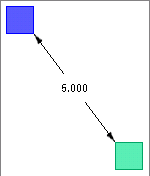
| Child Name: | firstBlock | |
| Child Design: | :Block | |
| Name | Type | Supplied |
| height | number | 1 |
| length | number | 1 |
| width | number | 1 |
| v100 | point | point(0,4,0) |
| color | string | "blue" |
| Child Name: | secondBlock | |
| Child Design: | :Block | |
| Name | Type | Supplied |
| height | number | 1 |
| length | number | 1 |
| width | number | 1 |
| v100 | point | point(0,3,0) |
| color | string | "jungle green" |
| Child Name: | parallelDim | |
| Child Design: | :LinearDimension | |
| Name | Type | Supplied |
| dimType | name | :Parallel |
| fromPoint | point | firstBlock.v100 |
| location | point | midPoint(firstBlock.v100, secondBlock.v010) |
| toPoint | point | secondBlock.v010 |
| charHeight | number | 0.18 |
LinearDimension_Ex02
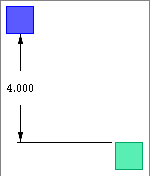
| Child Name: | firstBlock | |
| Child Design: | :Block | |
| Name | Type | Supplied |
| height | number | 1 |
| length | number | 1 |
| width | number | 1 |
| v100 | point | point(0,4,0) |
| color | string | "blue" |
| Child Name: | secondBlock | |
| Child Design: | :Block | |
| Name | Type | Supplied |
| height | number | 1 |
| length | number | 1 |
| width | number | 1 |
| v100 | point | point(0,3,0) |
| color | string | "jungle green" |
| Child Name: | parallelDim | |
| Child Design: | :LinearDimension | |
| Name | Type | Supplied |
| dimType | name | :Horizontal |
| fromPoint | point | firstBlock.v100 |
| location | point | firstBlock.v100 - unitX * 0.5 - unitY * 2 |
| toPoint | point | secondBlock.v010 |
| charHeight | number | 0.18 |
LinearDimension_Ex03
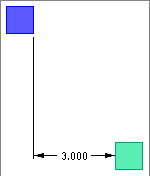
| Child Name: | firstBlock | |
| Child Design: | :Block | |
| Name | Type | Supplied |
| height | number | 1 |
| length | number | 1 |
| width | number | 1 |
| v100 | point | point(0,4,0) |
| color | string | "blue" |
| Child Name: | secondBlock | |
| Child Design: | :Block | |
| Name | Type | Supplied |
| height | number | 1 |
| length | number | 1 |
| width | number | 1 |
| v100 | point | point(0,3,0) |
| color | string | "jungle green" |
| Child Name: | parallelDim | |
| Child Design: | :LinearDimension | |
| Name | Type | Supplied |
| dimType | name | :Vertical |
| fromPoint | point | firstBlock.v100 |
| location | point | secondBlock.v010 - unitX * 1.5 - unitY * 0.5 |
| toPoint | point | secondBlock.v010 |
| charHeight | number | 0.18 |