Synopsis
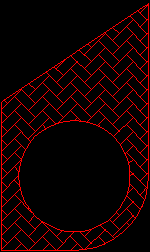
AutoCAD supplies a solid fill and many additional hatch patterns that you can use to differentiate the components of objects or represent object materials. You can choose from a pattern supplied with AutoCAD or from an external pattern library. Custom patterns can also be defined. Patterns can be scaled and rotated as well.
Mixins
BasePart
Canonicals
| Name | Type | Description |
|---|---|---|
| loops | list | A list of parts, or recursively, similar lists representing inner loops. The parts must be Lines, Arcs, etc., and coplanar. The endpoints must be chainable. The first and last points must be coincident. |
| patternName | string | Default is "Solid". |
Parameters
| Name | Type | Description |
|---|---|---|
| associative? | boolean | Default is False. If set to True, it is possible to get transitory odd behavior during the process of the update, as the boundary parts are moved by Intent, and as AutoCAD also simultaneously tries to keep the hatch up-to-date. |
| hatchStyle | name | Default is :Normal. Other choices include :Outer and :Ignore, but it isn't expected that these would be used typically. |
| patternScale | number | Default is 1.0. |
| patternAngle | number | Pattern rotation angle in degrees. Default is 0.0. |
| patternType | name | Default is :Predefined. Could also be :Custom. Note that :UserDefined is not a supported pattern type. |
Example 1

| Name: | hatch_Ex01 |
| Design: | BasePart |
| Child Name: | rectangle | |
| Child Design: | :rectangle | |
| Name | Type | Supplied |
| height | number | 2 |
| width | number | 3 |
| color | string | "jungle green" |
| Child Name: | hatch | |
| Child Design: | :hatch | |
| Name | Type | Supplied |
| loops | list | rectangle.lines |
Example 2
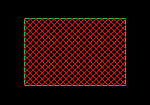
| Name: | hatch_Ex02 |
| Design: | BasePart |
| Child Name: | rectangle | |
| Child Design: | :rectangle | |
| Name | Type | Supplied |
| height | number | 2 |
| width | number | 3 |
| color | string | "jungle green" |
| Child Name: | hatch | |
| Child Design: | :hatch | |
| Name | Type | Supplied |
| loops | list | rectangle.lines |
| patternName | string | "ANSI37" |