Using this option, you can define or modify summary tables.
To begin defining summary tables, open the Summary tables - style manager dialog from:
- Menu: Formwork Drawings > Styles > Styles - tables
- Ribbon: ASD - Drawings > Settings > Styles > Styles - tables
- Command line: RBCX_STYLE_LIST.
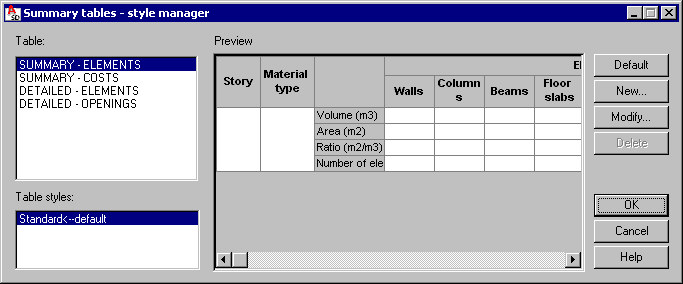
The following table types are available:
- Summary - elements
- Summary - costs
- Detailed - elements
- Detailed - openings
For each table type, you can choose a standard table style defined previously. Each table type you highlight is displayed in a preview pane.
Use the buttons on the right to further define the table:
- Default - click this to specify an indicated style as a default table layout (description style)
- New - click this to open the Definition of a new table style dialog, where you can define a new style (based on an existing style) for a selected table type.
- Modify - click this to open the Modification of table style dialog, where you can modify a selected table type and table style.
- Delete - click this to delete a highlighted table style.