Understand some essential settings for digital grid models (DGM).
If you have a choice of source data for your existing ground surfaces, create grid surfaces rather than TIN (triangulated irregular network) surfaces when possible. The difference in system memory requirements is significant for large surfaces. As a general rule, a grid surface, such as a DGM, requires about one-sixth (17%) of the memory space required by the same surface in TIN format.
Exporting a DGM File
AutoCAD Civil 3D enables you to export DGM files from a surface. At the time of export, you can expand the grid spacing to make the file smaller. Figure 3 shows the menu selection used to start the export process.
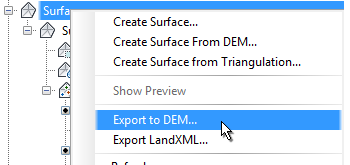
Figure 3: DGM file export
The Export Surface To DGM dialog box, shown in figure 4, is where you can set the grid spacing in the exported DGM file. A grid spacing of 2 covers a given area with one quarter the number of points required by a grid spacing of 1. Use a higher numeric setting here to create a DGM file that is smaller in size, and less detailed.
Determining Grid Point Level
An important export setting is the method for determining level at each point. You can choose to either sample the surface level at the grid point, or compute the average level from surrounding points. The latter method (averaging) is more time consuming. For greater efficiency, use the surface sampling option, as shown in figure 4.
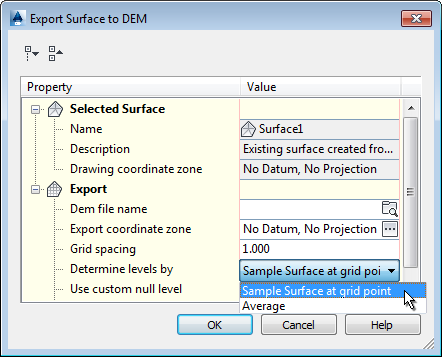
Figure 4: Optimizing settings for an exported DGM file