Field Assets for InfraWorks 360 is a simple, location-based application for viewing and commenting on the asset information in your model. When you start Field assets, models relevant to your location are available. When you're working in a model, you're zoomed to your current location. Assets in your field of view are displayed on an asset card. You can swipe through the assets and view their properties and comments.
With Field Assets you can:
- View and navigate your model in the field.
- Select assets and view properties.
- Search for particular assets.
- Add images and notes to individual assets or to the model in general.
- View basemap data in vector form (roads and buildings).
- View extended asset and event information (trees, crime incidents, accidents, gas chainages).
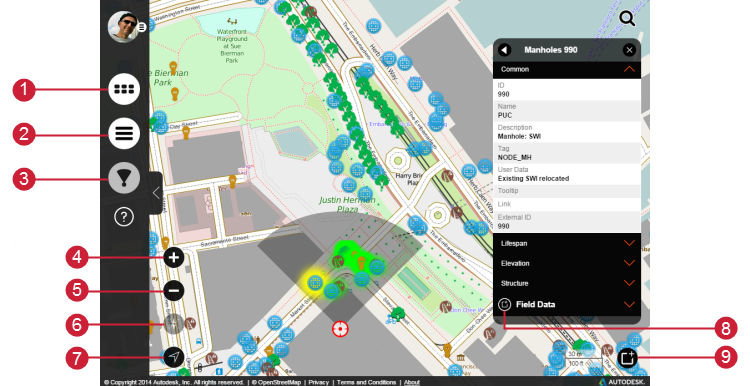
- Display models.
- Display layers.
- Display the asset view field.
- Zoom in.
- Zoom out.
- Toggle the asset view field north/south or relative to the device position.
- Zoom to your location.
- Add asset specific photos and comments.
- Add general photos and comments.