
-
Activate a Camera viewport. > Viewport navigation controls > (Perspective)
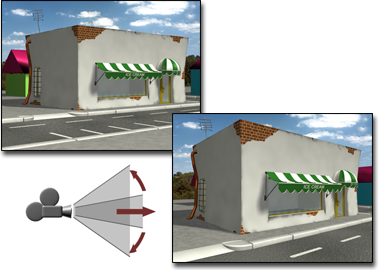
Adjusting perspective
Note: This button replaces the Zoom All button when a Camera viewport is active.
Tip: Hold down the  key to magnify the effect of the mouse on perspective adjustment.
key to magnify the effect of the mouse on perspective adjustment. A target camera can pass through its target object while you are using Perspective. When this happens, the FOV reaches its maximum angle of 180 degrees at the target location and cursor motion is reversed until you release the drag.
A free camera continues moving along an infinite path but uses an implied target position to control the FOV change rate. This implied target is defined as a point specified by the Target Distance field in the Parameters rollout for the free camera.
Procedures
To change perspective for a camera:
- Activate a Camera viewport.
- Click (Perspective).
The button highlights when it is on.
- Drag to change FOV and dolly simultaneously.
- Drag up to move the camera closer to its target, widen the FOV, and increase perspective flare.
- Drag down to move the camera away from its target, narrow the FOV, and decrease perspective flare.
- Press
 or right-click to turn off the button.