Use the tabs on the Workframe dialog to define a circular workframe:
- Definition
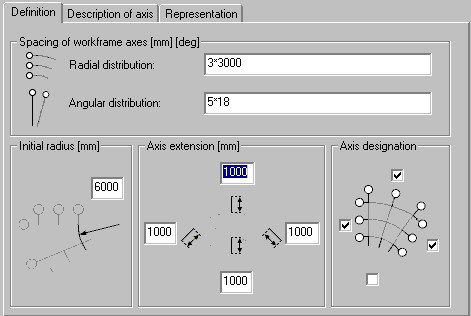
- Spacing of workframe axes - define workframe spacing (radial and angular)
- Initial radius - define the radius value of the first arc in a radial workframe
- Axis extension - define values of the axis extension outside the workframe
- Axis designation - select locations for axis descriptions.
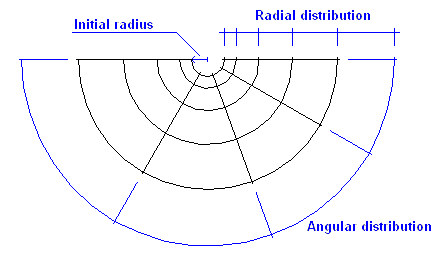
Workframe parameters are illustrated in the drawing below:
- Description of axis (horizontal and vertical)
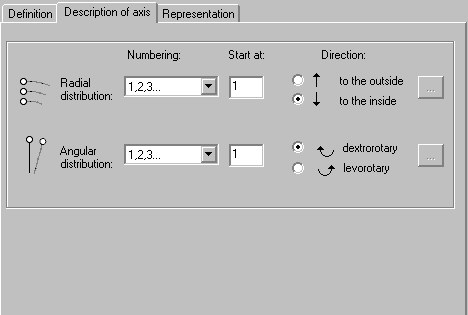
- Numbering - select a method of axis description
1, 2, 3 ...
A, B, C ...
I, II, III ...
a, b, c ...
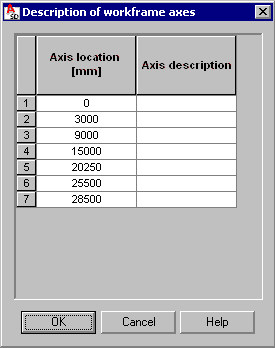
user-defined - this option enables the Browse (…) button, which opens the Description of workframe axes dialog. To define descriptions of workframe axes, specify a position and a description for each axis, and click OK.
- Start at - specify an initial value of the axis description (depending on a selected axis description type)
- Direction - specify a direction of axis description.
- Numbering - select a method of axis description
- Representation
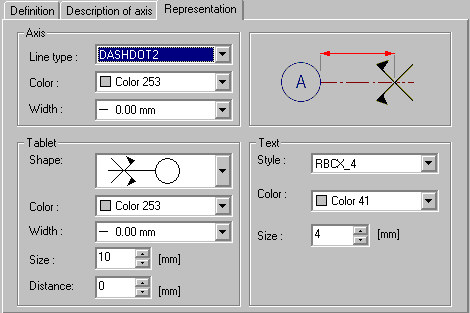
- Under Axis, specify line type, color, and thickness parameters
- Under Tablet, specify the parameters of the axis description:
- Shape (circle, ellipse, square, octagon)
- Color
- Width of the label line
- Size
If you select the shape that includes an axis designation (
 ), you can specify the Distance between the 2 symbols.
- Under Text, specify font style, color, and size.