Using the Section definition dialog, you can define or modify a section for a predefined section type:

 |
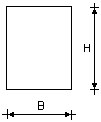
Rectangular opening |
H = height B = width |
|
||

|
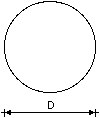
Round opening |
D = diameter |
|
||

|
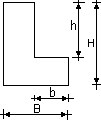
L-shaped opening |
h, H = heights b, B = widths |
|
||

|
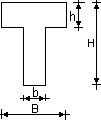
T-shaped opening |
h, H = heights b, B = widths |
|
||

|
Section of an arbitrary shape: |
|
 Define - in the drawing area, click to specify points that define the cross-section shape.
  Select - in the drawing area, select a polyline (created with AutoCAD®) that forms a closed contour.
 To add a new section to the list of sections available in Autodesk AutoCAD Structural Detailing - Formwork Drawings:
- Click a cross-section type icon
- For Name, enter the section name
- Specify the cross-section dimensions
- Click OK.
When defining an arbitrarily-shaped section, specify the name of the cross-section, and click either Define or Select.