After defining the steel profile, it can be accessed by selecting the option:
- Menu: Reinforcement > Definition - steel profiles > Steel profiles - description
- Ribbon: ASD - Reinforcement > Definition - steel profiles > Steel profiles - description
- Toolbar: Definition - steel profiles > Steel profiles - description

- Command line: RBCR_CREATE_STEEL_DESC.
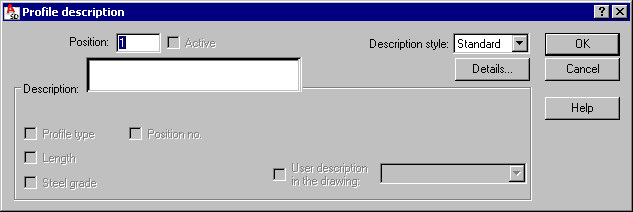
Options in this dialog specify a profile description by clearing active variables initialized on the basis of a defined syntax (e.g. profile type, profile length, steel grade).
The Position field is used to specify a number of a described element. If the Active option is selected, the profile described will be included in the table. It means that for a profile described for the first time the option is active by default. When the same profile is described twice, the option is cleared on its own. Thus it is possible to prevent (when the same profile is described twice) taking steel profiles into account twice in the table.
The User description in the drawing field adds any text to a steel profile description. The description is presented appropriately in drawings (included in profile descriptions in the drawing); the added text will be added to the selection list.
A style of steel profile description is selected from the Description style list; the list contains all description styles defined for steel profiles (the first item on the selection list is a default description style chosen in the Description of reinforcement shape dialog); parameters of a description style are modified before a steel profile description is inserted into the drawing; clicking Details, opens the Reinforcement description dialog where modifications of the style of steel profile description can be made.