After selecting the Modify: graphical parameters of reinforcement option, select bar reinforcement. The following dialog displays:

The following options are provided in the Bar shape field:
- Color - selection of a color with which reinforcement will be drawn; thickness of reinforcing bars is always drawn proportionally to their diameter
- If the Filled option is selected, then a reinforcing bar contour being drawn will be filled in completely with a selected color.
The End of straight bars option allows you to set the method of presenting bar ends in a drawing; the option includes only straight bars without hooks.
Reinforcing bar shapes are presented below:
|
- contour - filled |
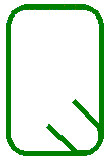
|
|
- contour - not filled |
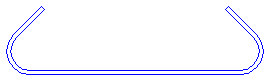
|
The options in the Bar - point field are used to modify the type of presentation of a reinforcing bar in a cross section. The following symbols (used to designate bars in a cross section) are provided on the drop-down list:

Moreover, a color can be chosen for the indicated symbol.
The options provided in the Distribution field apply to the distribution of the existing (with shape already defined) reinforcement. You can modify a color used to present distribution of reinforcement elements and line thicknesses.
The options from the Bar symbol field refer to reinforcement whose description is provided outside the formwork contour.
You can modify color and line thickness applied while drawing reinforcement. The following three buttons are used to determine the manner of reinforcement presentation:
- The first button provides rough (schematic) reinforcement presentation - in the form of a broken line
- The second button presents reinforcement together with bend curvatures
- The third button presents reinforcement showing real diameters and real dimensions.
If the third option is selected, then the Filled option is accessible which, when selected, allows you to fill in the drawn reinforcing bar shape. For rough presentation and presentation showing bend curvatures, the selection list of line thicknesses is available.
This field also includes the Added elements option; this is a list of elements to be added to a bar whose description is provided outside the formwork contour:
- Detailed table - in the case of a bar (whose description is provided outside the contour), whose length is linearly variable (the result of the linearly-varying distribution), a table containing a detailed list with a separate description of each bar is provided; for a bar of constant length, the table includes the description of bar dimensions.
- Chamfer dimensions - (horizontal and vertical) dimension lines describing chamfered segments of reinforcement
- Description of segment length - dimensions determining total length (with hooks included) of each bar segment
- Bent radius - in some cases information about the size of radiuses of roller mandrels that form bends, is needed.
The options included in the drop-down Size list are used to determine the size of reinforcement symbols. The following sizes are available:
- 1 : 1 - it indicates that a symbol size equals the size of reinforcement in an element formwork
- User-defined - once this option is selected, you need to indicate (graphically) the region in which the bar symbol is to be contained
- Scale coefficient - once this option is selected, there appears an edit field in which you determine a scale coefficient that will decrease or increase the symbol with respect to the real size of a bar included in a formwork; for example, entering the coefficient value of 0.5 causes the drawing to be twice as small, whereas entering a value of 2 means that the drawing will be twice as large.
The Surface distribution field allows you to:
- Modify the style of lines applied to draw top / bottom reinforcement
- Modify color and line thickness for reinforcement distribution
- Set (the Display option) the method of presenting reinforcement (significant for bars ended with hooks).