Use this option to define the reinforcement for a wire fabric shape. You can access this option clicking the Modify Reinforcement description  icon.
icon.
Note: There are two additional options accessible in the dialog: Description style (used to change a description style for selected reinforcement) and the Details button, when selected, the following dialog (for modification of the style of the reinforcement description (shape)) displays:
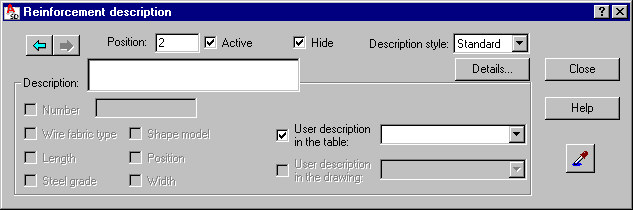
The options in this dialog are used to specify the final selection of a reinforcement description. Selections can be achieved by clearing active variables initialized on the basis of a defined syntax.
REMARKS:
- Description of a reinforcement shape is possible only for a single position, i.e. two or more wire fabrics cannot be described simultaneously.
- The Number edit field is used to enter the final number of wire fabrics that will be included directly in a table.
- The Active option. If the option is selected, then the described reinforcement should be considered in the reinforcement table. This option will be active by default, for reinforcement that is described for the first time. When the same reinforcement is described for the second time, the option clears. In this way it is possible to prevent (when describing the same reinforcement twice) doubling the number of reinforcement elements calculated when preparing a reinforcement table; a description of active and not active reinforcement may differ in a generated drawing - the options used for this purpose are provided in the Description of reinforcement shape dialog.
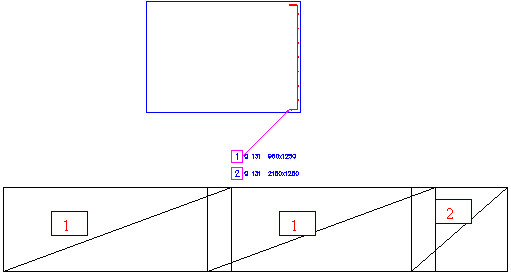
- In the case of the linear distribution, 2 different wire fabrics (with two different numbers) can be placed in a region; a description of the distributed wire fabric in cross-section, after its distibution is performed, shows a number of wire fabrics (see the drawing below); while modifying such a description of the wire fabric in cross section, it is possible to hide one of the wire fabrics (the Hide option should be used); the arrows allow switching between two wire fabrics included in the distibution.
- The fields: User description in the drawing and User description in the table enable adding any text to a reinforcement description (by entering it from the keyboard); the description will be presented correspondingly in drawings (included in wire fabric descriptions in the drawing) and in the table (included only in the reinforcement table); since that moment the added text will be remembered (on the selection list) and you will be able to use it later on; a text taken from the library of standard descriptions may also be applied. These descriptions assume the style of the text describing the reinforcement. The user description is displayed in several lines; then the mechanisms accessible in AutoCAD® are applied. The user description together with an extension line and a label make up one object. Such an object may be edited (translated, rotated); to do that, first use the EXPLODE option.