Use this option to define/modify lap splices in reinforcing bars if the bar length exceeds the bar length defined in the database. After defining the bar whose length is greater than a value of the maximal bar length and accepting the information about division of the reinforcing bar, the following dialog displays:
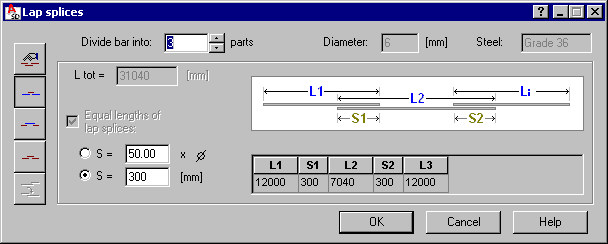
The left part of the dialog provides the following icons used to determine methods of lap splice definition:
 - Manual definition (a lap splice is defined in the table provided in the bottom part of the dialog by specifying lengths of successive bar segments L1, L2, ... and lengths of lap splices S1, S2, etc.)
  - Bar is divided in the direction 'from outside'
  - Bar is divided in the direction 'from inside'
  - Lengths of all bars are equal
  - Lengths of the first and last bars are identical.
The top part of the dialog includes information for the divided bar:
- Number of bar divisions (this value is modified in the dialog - the value is available only if all segments are equal and if bar is divided into segments manually)
- Bar diameter and steel grade (neither of these values can be changed in this dialog).
The lower part of the dialog includes the following data:
- Bar total length (with bar lap splices included - it is the total of all bar segments with lap splices)
- If the Equal lengths of lap splices option is selected, then all the lap slices in bar will be of identical length; lap splice length can be determined by giving the value of lap splice length or as a multiplier of bar diameter.
The bottom part of the dialog box includes a table presenting the defined bar division into successive segments:
- L1, L2, L3, etc. denote lengths of successive bar segments
- S1, S2, S3, etc. denote lengths of successive lap splices in bar.