Use this option to modify reinforcing bars (transversal reinforcement) in the cross-section of an RC structure element. There are several ways to access the option:
- Menu: Reinforcement > Modify > Reinforcement
- Ribbon: ASD - Reinforcement > Modify > Modify Reinforcement
- Toolbar: Modify > Modify Reinforcement

- Command line: RBCR_MOD_REINF.
The following dialog displays:
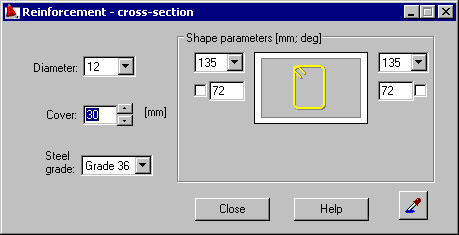
The following parameters of a reinforcing bar (transversal reinforcement) may be modified:
- Bar diameter (the current diameter of a reinforcing bar is presented in the edit field).
- Reinforcing bar cover (the current cover of a reinforcing bar is presented in the edit field).
- Steel grade (the current steel grade is chosen from the selection list).
- Shape parameters, i.e. parameters of anchors of reinforcement ends: hook angle and hook length; you can lock a hook length by selecting the option next to the edit field for defining a hook length (
 appears); the edit field becomes inaccessible. If you modify parameters (length or diameter) of a bar with locked hook length, the hook length does not change.