Use this option to modify reinforcement distribution. There are several ways to access this option:
- Menu: Reinforcement > Modify > Reinforcement
- Ribbon: ASD - Reinforcement > Modify > Modify reinforcement
- Toolbar: Modify > Modify reinforcement

- Command line: RBCR_MOD_REINF.
After selecting the option and reinforcement distribution, the following dialog displays: 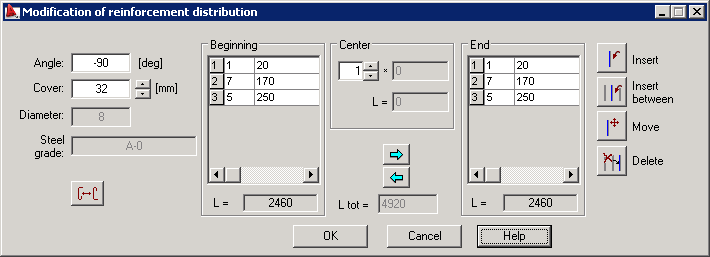
The following parameters of a reinforcing bar can be modified:
- Value of a distribution angle - this is the angle between bars in the defined distribution and the line of distribution (the current angle is presented in the field next to the option).
- Reinforcing bar cover (the current cover of a reinforcing bar is presented in the field next to the option).
- Spacing beetwen bars in the Beginnig, Center and End zones of reinforcement distribution (current spacings of reinforcement distribution are presented in the Beginning, Center an End fields, respectively).
The following icons are located on the right side of the dialog:
 Insert - inserts a reinforcing bar at the selected location
 Insert between - inserts a reinforcing bar between 2 selected reinforcing bars
 Move - moves a reinforcing bar; you should specify a translation vector
 Delete - deletes a selected reinforcing bar.