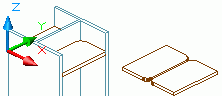
When you cut a plate with a beam or another plate, use the Element contour tool. The type of processed cut depends on the switch setting on the Switch panel of the Objects tab.
- Click Objects tab
 Switch panel
  (Exact cross section).
 - On the Features tool palette, click
 (Element contour).
 - Select near a corner of the plate to modify.
- Next, identify the element that causes the modification; in this example it is the column.
TRepeat the same steps for the other plate.