Select a color then use the Erase Paper plug-in.
This feature is available in all Alias products.
How to make all areas containing a given color transparent
- Choose Utilities > Plug-in Manager
 and select the
erasePaper
plug-in in the Paint section (put a check mark in both columns).
and select the
erasePaper
plug-in in the Paint section (put a check mark in both columns). The Erase Paper tool plug-in
 is added to the
Paint Edit
palette.
is added to the
Paint Edit
palette. - In the Canvas Layer Editor , select the canvas and layer you want to affect.
- Select the color you want to make transparent. (Choose a Brush tool to open up the color swatch in the upper left corner of the interface, which displays the default brush color.)
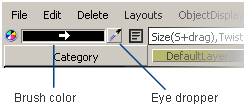
The quickest and most accurate way to select a color is by using the eye dropper. Click the eye dropper then click the color you want on the canvas.
- Choose
Paint Edit > Erase Paper
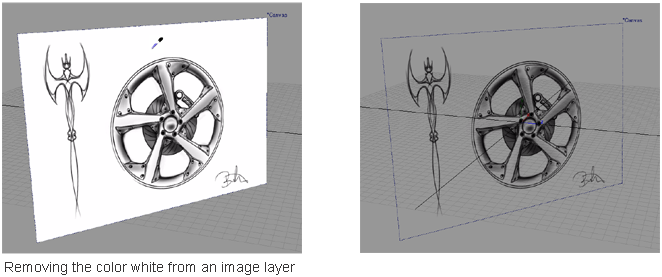
The color is removed.
 Note:
Note:In Design and Automotive, and AutoStudio the image layer is duplicated before the color is removed. The new layer contains the original un-erased version, which you can access through the Canvas Layer Editor.
- Repeat the process for another color, or another layer, if needed.