Provides the means to insert, edit, fix, or unfix a wire number.
Find Command entry:
AEEDITWIRENO
Command entry:
AEEDITWIRENO
Edit Wire Number provides the means to:
- Modify the wire number value
- Fix or unfix the wire number
- Change the visibility of the wire number
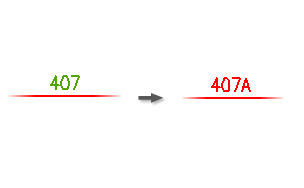
When a wire number is fixed, the wire number attribute is renamed and moved to a special fixed wire number layer. Assigning a different color to this layer makes it easy to identify which wire numbers are fixed and which are normal. The layer name for fixed wire numbers is entered in the Define Layers dialog box (from the Drawing Properties  Drawing Format dialog box).
|
Wire Number |
Specifies the wire number to edit. Use the arrows to scroll through possible wire numbers. If you enter an existing wire number during the insert/edit process, a warning dialog box displays. Turn off the warning in the Project Properties Note: An error log file is created for every project regardless whether you chose to display a dialog box or not. The warning is saved in the log file named "<project_name>_error.log" and is saved in the User subdirectory.
|
|
Pick |
Prefills the wire number edit box with the text entity you select. Use Up or Down to quickly increment or decrement the wire number. |
|
Make it Fixed |
Fixes the wire number so that it does not change if later processed by the automatic wire numbering utility. |
|
Visible/Hidden |
Displays or hides the wire number on the drawing. Hidden wire numbers are still present and appear in wire reports. See also: Erase or hide wire numbers |
|
Zoom |
Restores the previous screen view. Do a zoom extents to follow an untagged wire that travels off screen. |