AutoCAD Electrical can generate any of hundreds of different PLC I/O modules on demand, in a variety of different graphical styles, all without a single, complete I/O module library symbol resident on the system. Modules automatically adapt to the underlying ladder rung spacing, whatever that value is, and can stretch or break into two or more pieces at insertion time. It is possible because AutoCAD Electrical generates PLC I/O modules through a parametric generation technique driven by a PLC database (ACE_PLC.MDB).
The PLC database contains the stack sequence and text values to annotate onto each symbol in the stack. As AutoCAD Electrical builds the module, it reads the underlying ladder rung spacing and spreads out the stack or compresses it to match the rung spacing. During the insertion process, you can interrupt it to break the module and then restart it at a different location.
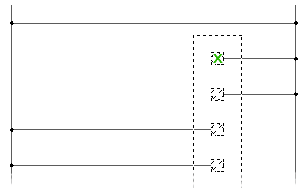
Parametric PLC symbols vs. Full Units
Parametric PLC symbols are stored in \Users\Public\Documents\Autodesk\Acade {version}\libs\{library}\.
The file names begin with the characters "HP" (Horizontal ladder rungs / PLC) or "VP" (Vertical ladder rungs) followed by a digit that corresponds to a PLC I/O style number. Each symbol is a building block with a different arrangement of attributes and wire connection points. AutoCAD Electrical selects the appropriate symbols to use, stacks them together in the order defined by the data file, and produces a completed I/O module.
The PLC database file (ace_plc.mdb) is used to drive the PLC I/O module generation process. You can modify the PLC database file manually or using the PLC Database File Editor (recommended method). The AutoCAD Electrical PLC database file (ace_plc.mdb) is installed in C:\Users\{username}\Documents\Acade {version}\AeData\{language code}\PLC.
Each Parametric PLC symbol is a building block with a different arrangement of attributes and wire connection points. AutoCAD Electrical selects the appropriate symbols to use, stacks them together in the order defined by the parametric data file, and produces a completed I/O module. AutoCAD Electrical inserts the symbols based upon the rung spacing of the underlying ladder, explodes them, draws a rectangular box around the entire assembly, creates a single block out of the collection, and annotates the attributes of the new module.
Some PLC units may not lend themselves well to parametric generation. If a PLC module symbol is built with the appropriate attributes in place and the symbol name follows naming convention of AutoCAD Electrical (the block name begins with "PLCIO"), it can be inserted as a single unit using the Insert PLC (Full Units) command. The selected unit inserts into the ladder, breaks the wires, and then reconnects.