Characters representing fractions and tolerances can be formatted to conform to several standards.
Stacked text refers to the fraction and tolerance formats applied to characters within multiline text object and multileaders.
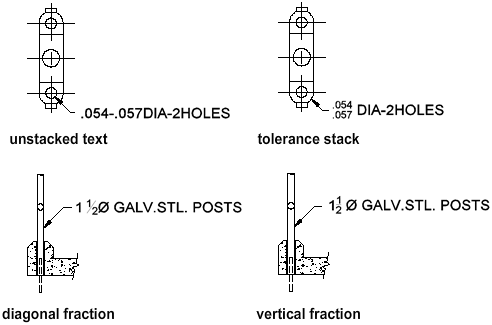
You use special characters to indicate how selected text should be stacked.
- Slash (/) stacks text vertically, separated by a horizontal line.
- Pound sign (#) stacks text diagonally, separated by a diagonal line.
- Carat (^) creates a tolerance stack, which is stacked vertically and not separated by a line.
To stack characters manually within the In-Place Text Editor, select the text to be formatted, including the special stacking character, and right-click. From the shortcut menu, click Stack.
Stack Numeric and Tolerance Characters Automatically
You can specify that numeric characters entered before and after a slash, pound sign, or carat will stack automatically. For example, if you enter 1#3 followed by a nonnumeric character or space, the AutoStack Properties dialog box is displayed by default, and you can change the settings in the Stack Properties dialog box to specify your formatting preferences.
The automatic stacking feature applies only to numeric characters immediately before and after the slash, pound sign, and carat. For tolerance stacking, the +, -, and decimal character also stack automatically.