You can control how you change between the Model tab and one or more named layout tabs.
By default, a Model tab and several named layout tabs are displayed at the bottom-left corner of the drawing area.
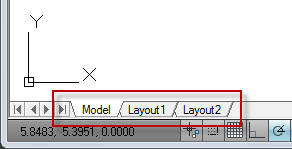
To optimize space in the drawing area, you can hide these tabs and display equivalent buttons on the status bar instead.

The control to change between the two interface options is included as an item on the Model and layout tab shortcut menu, and on the shortcut menu of the Model/Layout button on the status bar.
Note:
Access to the complete set of shortcut menu options is available from the tabs only.