Navigation functions such as rotate, pan, and zoom are now available using the Autodesk standard tool set. As in previous releases, you can manipulate the model from icons in the View tab.
There are the additional options of using either the View Cube to rotate the part select a function from the Navigation Bar. These tools can be configured to appear in the corner of the window that suits your work patterns or hidden completely.
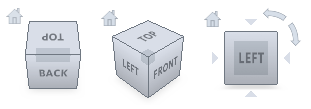
Click and drag on the View Cube and the model will rotate accordingly. Click on a corner, edge, or face and the model will orientate itself so that the selected view is presented.
For easy access, the navigation icons that are available on the View tab are also available on the Navigation Bar. The position of this bar can be configured so that it matches your work habits.