Sink marks result from localized shrinkage of the material at thick sections of the part.
A plastic part solidifies from the outside surface to the center of the part. On cooling, sections of the part that are thicker than the surrounding area can have a small reservoir of molten material in the center of the part. As this reservoir solidifies, it shrinks, drawing the surface inwards to form a sink mark.
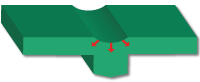
Sink marks appear as depressions on the surface of an injection molded part. These depressions are typically very small; however they are often highly visible, because they reflect light in different directions to the rest of the part. The visibility of a sink mark is dependant on the color and surface texture of the part.
Where possible, change the part design to minimize thick sections. Manufacturing parameters can be adjusted to reduce or possibly eliminate sink marks.
The Sink mark element examines the geometry of the part and highlights where sink marks will be formed.
To view the sink mark contribution to the indicator value, click . The Alerts icon on the same panel will define any sink mark alerts.
Sink mark alerts
 panel will display a sub-menu. The sub-menu items are outlined below:
 - Sink marks
- Sink marks are represented on the part as red areas.
- Show thick regions
- Areas of the part that are significantly thicker than the nominal part thickness are highlighted in red. Placing injection locations on thicker areas of the part reduce the incidence of sink marks.
- Injection location toolbar
- This toolbar enables the addition, relocation or removal of injection locations. Injection locations are the positions where molten plastic enters the metal injection mold. Where possible injection locations should be placed so that the material flows from thick to thin sections of the part. This will reduce the incidence of sink marks.
- Animation toolbar
- This enables the user to view the filling animation. Thick sections that fill towards the end of the cycle have a greater tendancy to form sink marks. Understanding how the part is filled can assist in understanding how to adjust or where to add injection locations.
Sink mark visualization
The location of sink marks can viewed. Click on . Click on the Sink Marks option in the Information pop-up tab.
Sink marks are represented on the part in red.