An undercut is a design feature that interferes with the ejection of a molded part from the mold. An undercut can include features such as holes or boses that are not aligned with the direction of ejection, threaded sections, and snap fingers.
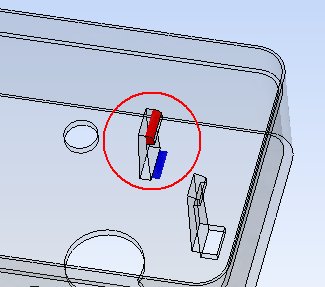
Figure 1: Undercut problem
The snap finger shown above has an undercut surface highlighted in red.
This part could not be produced without the inclusion of moving parts within the mold to ensure the part could be ejected. This will add to the cost of the mold.
The Undercut element examines the part and highlights regions that could cause molding ejection problems.
Undercut alert
A significant amount of undercut area will trigger an alert. All undercuts should be investigated to ensure the finished part can be removed from the metal injection mold.
Undercut visualization
Click on the Undercut option in the Information  pop-up tab to view this result.
The undercut on a part can viewed. Click on . Click on the Undercut option in the Information pop-up tab.
Surfaces with an undercut are highlighted in red. This is based on the part being ejected from the mold cavity in the specified Pull direction.
Design suggestion
The inclusion of a hole at the base of the snap finger shown below, will allow a fixed rectangular pin to be included in base of the mold. This design modification will allow the part to be ejected without the need for moving parts in the mold.
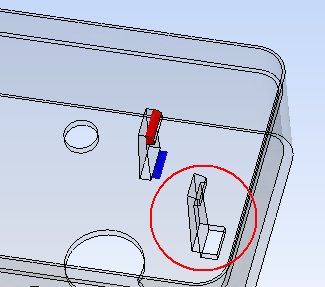
Figure 2: Modified design
It is not always possible to design a part without undercuts.