Statuses for items in a lifecycle must be configured to produce the end result which is a SIF file export. The SIF file is a text file containing updates to items status which is then imported into the master database so the complete item history can be dispalyed via management reports etc.
All SIF files from each station in the lifecycle of an item are fed back to the master database. These SIF files will contain time stamps enabling reports on drawing time, fabrication time, delivery and installation for example.
To begin configuring Statuses select Scan Mode from the Trackit Toolbar and then select Options.
Click the General tab to set the main triggers for Trackit to execute.
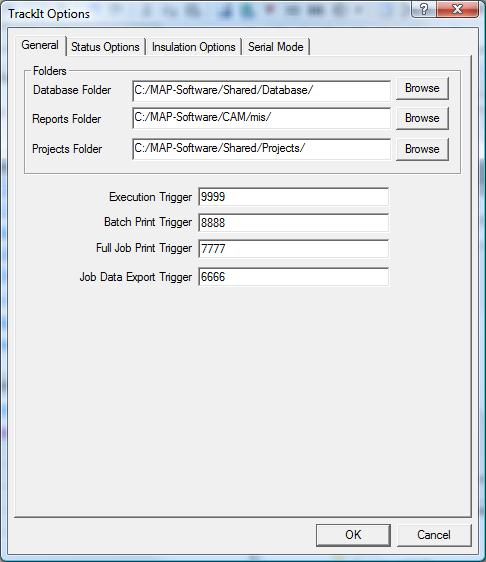
Trigger key sequences are events which when keyed/scanned via barcodes, then process the relevant command. The four types of triggers listed here are:
- Execution Trigger: Based on the mode Status or Insulated, the execution trigger will either perform the Status change or produce a BIR request for Insulation. (aka the "GO" trigger.)
- Batch Print: Prints all items currently held in Trackit (Job by Job) using the selected reports.
- Full Job Print : Prints all items in the job relating to the scanned item.
- Job Database Export : Performs a Data export using a pre-defined Export format.
Now confirm any changes by selecting OK. Select Scan Mode > Options and then Status Options tab.
Status Options
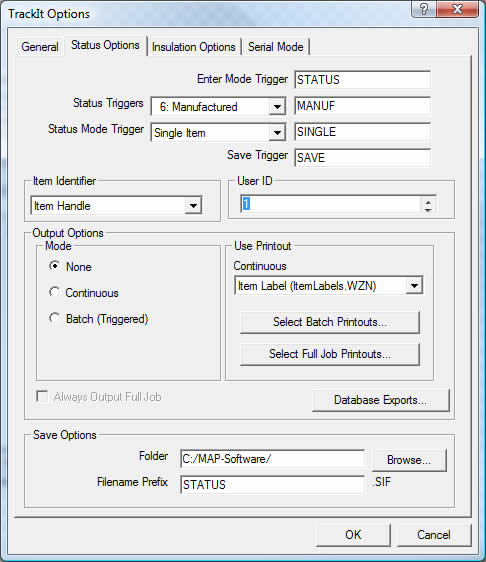
Enter Mode Trigger relates to this tabs selection when scanning "Status mode Trigger" from your scanner or entry. This trigger would normally be set to "STATUS".
Status Triggers can be defined for each status in the database. These Triggers allow selection of the status when entering the items status change.
The example above shows the Manufacturing status with a trigger of "MANUF". This trigger can be assigned to your printed worksheet so when scanned/keyed, the status is changed in the main Trackit takeoff screen. This works will all other statuses providing they have their unique trigger strings set. For Example:
- Design: Trigger maybe = "DESIGN"
- For Approval: Trigger maybe = "FORAPPV"
- Approved: Trigger maybe = "APPV"
- Issued for Manufacture: Trigger maybe = "ISSUEM"
- Manufactured: Trigger maybe = "MANUF"
- Assembled: Trigger maybe = "ASSEM"
- Quality Control: Trigger maybe = "QUALI"
- In Transit: Trigger maybe = "TRANS"
- Delivered: Trigger maybe = "DELIV"
- Installed: Trigger maybe = "INSTAL"
Status Mode Trigger is either Single or Spool.
- Single Item selects each item once at a time and exports the SIF file containing individual items.
- Spool is for selecting one item in a Spool Drawing for the software when the SIF file has been updated to the master database, to also update all items relating to the same spool entry as that one item scanned in. (Item Spool) If continuously updating spooled drawings or combinations or items in the same run. Spool can be used to save entry/scanning of each individual item.
Item Identifier can be determined in three levels. The identifier is the criteria for how Trackit will find the items for then changing its statuses.
- Item Number; the number on the item allocated by the user at Takeoff. The criteria would be Job Number and then Item number in the job.
- Handle is a hexadecimal entry automatically assigned per Job against each item. Criteria would be Job Number and then Item Handle.
- Item GUID is a unique number assigned to the item that contains job and item. No GUID across jobs are the same and automatically assigned to each item.
If using multiple stations, User ID can be assigned for logging which user has assigned which status change.
There are three different Output Options to choose between which are None, Continous or Batch (Triggered).
- None disables the Print mechanism.
- Continuous will automatically print the selected report each time an item is scanned. The report to print is selected from the Continuous drop down box.
- Batch (Triggered) printing will spool the scanned items until the order to print has been given via the trigger. Multiple reports can be selected via the Select Batch Printouts option.
The reports that are available are determined by the Reports path on the General tab.
Always Output Full Job and Database Exports: Can only be selected when in Batch (Triggered) mode and will print/export all items in the job each time the trigger for Print is given.
Save Options are determined so that Trackit can export the SIF file to a destination folder and prefix string for the SIF file.