When using CAM-Duct or Profile Master it is possible to use Common Line Cutting. This will cut down the cutting time of nested sheets/plates and also reduce the heat and therefore distortion created when cutting. When using this feature it works best along straight edges only.
The following will give the user a step - by - step guide on how to use Common Line Cutting.
- Create some relevant parts, in this case 10 plates 300mm x 300mm will be used.
- When these have been created go to Utilities > Automatic Nesting and the parts will be nested as usual.
- Ensure the margin between parts is set as per the kerf value. This would need to be the minimum value entered to allow for kerf compensation - Kerf values can be viewed from Installed Machines > Tools section. For example a Kerf Value of 1 must have a margin between parts set to at least 1.
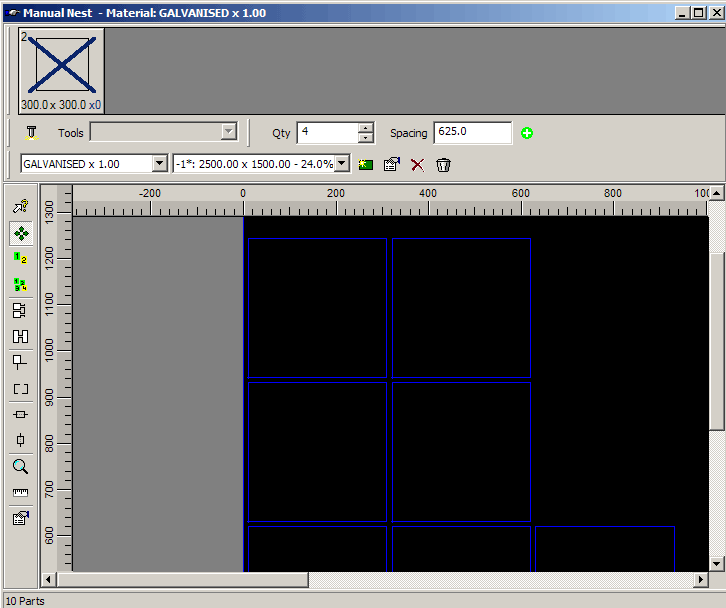
- Note that the parts are nested with the margin between them but will later be removed automatically when writing the NC with Common Line selected.
- Before the NC is written, select a single sheet or make a window around multiple sheets and right click.
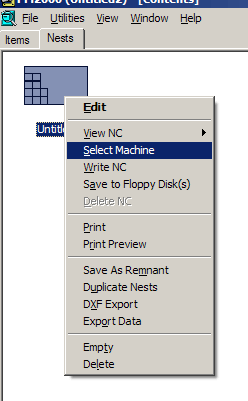
- From the menu that appears, choose Select Machine.
- The Sheet Machine Options dialogue box will appear.
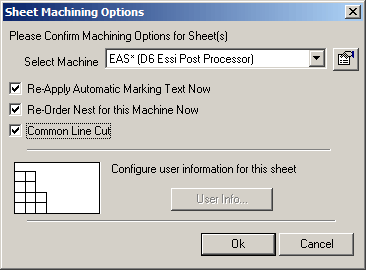
- From the drop down menu at the top select the relevant machine.
- Ensure that the Common Line Cut option is ticked.
- Click OK to return to the Job Contents screen.
- Click Utilities > Write NC and the following dialogue box will appear.
- Click OK.
The sheet(s) will now be given NC numbers as normal.
Note: The Sheets have now been nested and have had NC written that will ensure that the Common Line Cut method will be used.
It is now possible to view the NC on the screen before it is actually cut.
- Right click on a relevant sheet and select View NC.
- The NC Reader screen will appear.
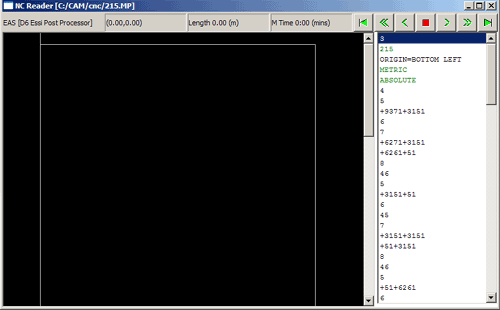
- It is now possible to navigate through the NC Data using the controls on the right.
- This allows the user to see exactly what will be cut on the cutting machine.
Depending on the users own particular machine configuration, the completed NC data will be similar to the one below.
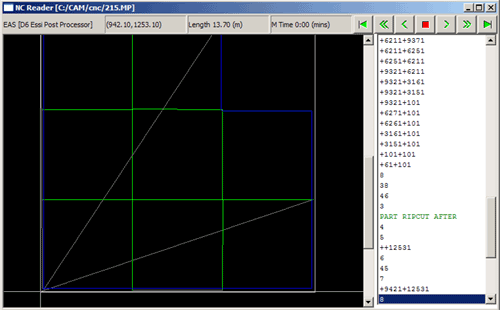
Note that there is no longer a margin between the nested parts and that a 'common line' has been used to separate them.