Problem: After starting CAD-Duct the BSS toolbar is missing.

Solution1: Attempt to APPLOAD and install ARX into the Start-up Suite.
Solution2:Find the name of the AutoCAD - Main Customization File (cui or cuix):
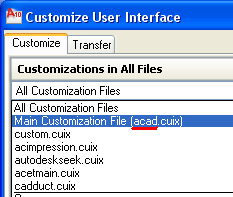
- Close AutoCAD.
- Browse to your CAD-Duct installation.
- Run Ueditmap.exe.
- Select the CAD Options tab.
- Enter the Main cui / cuix name in the Specify Menu Group:
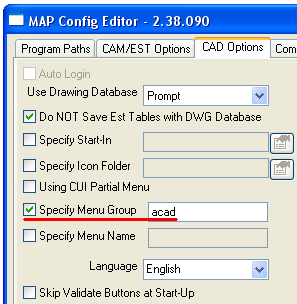
- Ok the change.
- Start AutoCAD.
- The CadDuct Solids BSS toolbar should now be visible.