To provide a list of the drawing commands and shortcuts used within the Opus 5 program
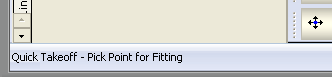
When using the commands that are listed below. It is always best practise to view what is displayed in the status area of the software. This is located towards the bottom left of your view when in the 3D Viewer. This helps you understand what is expected of you when running a command.
Here is a breakdown of all the commands and a description as to what each one can achieve by selection.
ALIGN (AL) : Align
ALIGNTO (ALT) : Align To
Arc (A) - Arcs
ARCCSE (ACSE) : Arc - Centre, Start, End
ARCSCE (ASCE) : Arc - Start, Centre, End
ARCSEC (ASEC) : Arc - Start, End, Centre
ARCSEM (ASEM) : Arc - Start, End, Middle
ARRAY (AR) : Array - Rectangilar
ARRAYPOLAR (ARP) : Array - Polar
BASEQTY (QTY) : Development Base Quantity
BREAK (BR) : Break
CHAMFER (CHA) : Chamfer - Distance + Distance
CHAMFERANGLE (CHANG) : Chamfer - Distance + Angle
CIRCCUT (CC) : Cut Out - Round
CIRCLE (C) : Circle
COPY (CO) : Copy Object(s)
COPYCLIP (COC) : Copy to Clipboard
COPYCLIPBP (CCBP) : Copy with Base Point
CUTCLIP (CU) : Cut to Clipboard
CUTCLIPBP (CUBP) : Cut with Base Point
DELETE (DEL) : Delete Object(s)
DELREFPTS (DRP): Reference Points - Delete All
DIMALIGNED (DAL) : Dimension Aligned
DIMANGULAR (DAN): Dimension Angular
DIMDIAMETER (DIA) : Dimension Diameter
DIMLABEL (DLB) : Dimension - Label
DIMLINEAR (DLN) : Dimension Linear
DIMORDINATE (DOR) : Dimension - Ordinate
DIMRADIAL (DRD) : Dimension Radial
DISTANCE (D) : Distance
DXFEXPORT (D) : DXF EXport
DYNAMICRULER (DR) : Toggle Dynamic Ruler
ELLIPSE (EL) : Elipse
ERASE (E) : Delete Object(s)
EXTEND (EX) : Extend
FILLET (F) : Fillet Extend
FILLETJN (FJ) : Fillet Junction (pt)
GRID (G) : Grid Spacing
GRIDDISPLAY (GD) : Pick Grid Display Components (Points/Lines/Pattern)
GRIPS (GR) : Toggle Drag Grips
GROW (GW) : Grow
HELP (?) : Displays the List of Commands
IMPORTITEM (II) : Import Items
IMPORTVECTOR (IV) : Import an Image to Vector (R2V Dongled Option)
INSPOINT (IP) : Insertion Point
ITEMPASTE (IPST) : Paste to new Item (Saves Pasted entities to an Item File)
ITEMPROP (IP) : Item properties
JUNCNOTCH (JN) : Junction Notch
LAYMCH (LA) : Assign Island to the Current Layer
LENGTH (LN) : Length
LINE (L) : Lines
MARKER (MK) : Reference Points (Marker)
MARKINGTEXT (MT) : Marking / Printing Text
MIRROR (MI) : Mirror
MODIFYTEXT (MT) : Modify Text (Applies to Marking, Dimension Text (Labels), and Notes only)
MOVE (M) : Move Objects
NODESTRETCH (NSTR) : Drag Multiple Nodes
OBJECT (OBJ) : Will open the Object(s) screen
OFFSET (O) : Offset Distance
OFFSETPOINT (OP) : Offset - To Point
OPUS (OS) : Opus 5
PAN (P) : Pan View
PARTNOTES (PN) : Part Notes Text
PARTPASTE (PP) : Paste to new Part
PASTECLIP (PC) : Paste from the Clipboard
PERP : Perpindicular
PIERCE (PI) : Pierce
PROFILER (PR) : Profiler
RECTANG (REC) : Rectangle
RECTCUT (RC) : Rectangular Cut Out
RECTNOTCH (RN) : Rectangular Notch
REFPOINT (RP) : Create a Reference Point
REGEN (RG) : Regenerate all Graphics
REPAIR (REP) ; Repair
ROTATE (RO) : Rotate Objects
SCALE (SC) : Scale
SELECTALL (SELA) : Select All
SELECTINV (SELI) : Invert Selection
SELECTNONE (SELN) : Deselect All
SETTINGS : Edit / View 3D Viewer Settings
SLICE (SL) : Profiler Slice
SLIT : Slit
SLOTHOLE (SH) : Slotted Hole
STRETCH (S) : Stretch
SUMMARY (SUM) : Summary
SVEENOTCH (SVN) : Sloping Vee Notch
TAGNOTCH (TN) : Tag Notch
TRIM (TR) : Trim
TRUETYPE : (TT) True Type Text
UNDO (U) : Undo last change
VEENOTCH (VN) : Vee Notch
ZOOMTOFIT (ZF) : Zoom to Fit Current View in Window
ZOOMTOSELECT (ZS) : Zoom to Selected Item(s)
ZOOMTOWINDOW (ZW) : Zoom to Selected Region