Define your own properties that can be passed to some of the user subroutines.
Currently, the following routines support user properties:
- UDMGINI2
- UDMGINI3
The properties are defined in the *USER MATERIAL keyword of an Abaqus analysis or using the TBDATA command in an ANSYS analysis when the relevant material is being defined. Since Simulation Composite Analysis has reserved the first sixteen constants for these keywords, the user properties are defined starting at the seventeenth constant.
User properties are sent to the user subroutine through the variables NPROPS and PROPS. NPROPS is an integer specifying how many user properties were defined. PROPS is a double precision array of NPROPS length which holds the defined user properties.
The following is an example of defining a Simulation Composite Analysis material with user properties in Abaqus (see the Abaqus Keywords Reference Manual for more information on the keywords used). In this example USER MATERIAL constants 1-16 are the typical constants used to define a Simulation Composite Analysis material. Constants 17-19 hold the user properties.

The above example would result in NPROPS and PROPS being sent to the user subroutine as the following:
NPROPS = 3
PROPS = [10.0, 0.56, 1.5E+6]
The following is an example of defining a Simulation Composite Analysis material with user properties in ANSYS (see the ANSYS Mechanical APDL Command Reference for more information on the MAT, TB, and TBDATA commands). In this example, TBDATA constants 1-16 are the typical constants used to define a Simulation Composite Analysis material. Constants 17-19 hold the user properties.
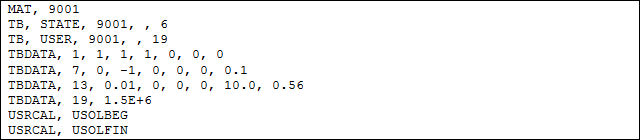
The above example would result in NPROPS and PROPS being sent to the user subroutine as the following:
NPROPS = 3
PROPS = [10.0, 0.56, 1.5E+6]
Note the addition of the USRCAL commands. These are necessary for Simulation Composite Analysis to work correctly. Typically a Simulation Composite Analysis material is added to the ANSYS model by using the COMPAN macro which automatically issues the above USRCAL commands. However, when using a user subroutine with user properties, the COMPAN macro is not sufficient and the raw ANSYS commands must be used. Therefore the USRCAL commands must be explicitly added.