- As you dimension the part, create parameters by typing in the name of the parameter followed by the value. For example, Length=75mm.
- On the ribbon, click 3D Model tab
 Show Panel icon
  . Select Parameters panel to display the Parameters panel, and then select Parameters
- Determine which parameters and properties to change with each member. Rename parameters with descriptive and recognizable names.
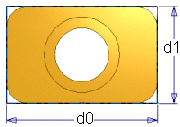 In this example, dimensions display as d0 and d1. You can create the parameters Length and Width as you add these dimensions, or open the Parameter table and rename them to Length and Width.
 - Create relationships with other parameters as needed. For example, set the cylinder hole center position to length/2 or width/2. In the graphics window, fx precedes parameters that are defined by relationships to other parameters.
As you create or edit features, you can enter parameter names or equations in the dimension dialog box or in the feature dialog box.
- Save the file.