You can edit 3D geometry for underground ducts and perform pulling tension analysis for 3D ducts.
- Draw the duct in 2D. See To Lay Out Underground Design Features.
- On the command line, enter AUDTRANSITIONPOINT to open Transition Points palette.
Each row in the Transition Points palette represents one transition point. The ID column indicates the sequence of transition points.
- Select the segment that represents the duct.
Transition point information is displayed in the palette. By default, the start and end points of the duct are provided. The following steps can be done both in 2D or 3D mode.
- To add transition points to the segment/duct, use either of the following methods:
- Click Invoke AudTransitionAdd Command
 . Click to specify a point on the duct.
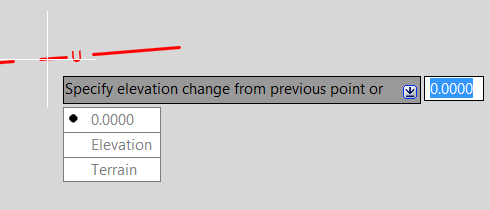
 Enter the elevation change from the previous point or choose one of the following options: Click 0.0000 to specify no change in elevation from the previous point. Click Elevation and enter the exact elevation of the new transition point. Click Terrain to specify the elevation change based on the insert point's elevation on the terrain.
- Click a row in the Transition Points palette. Click Add Transition Point
 .
. A new transition point is added at the midpoint between the selected transition point and the previous transition point. Edit the values of the new transition point.
- Click Invoke AudTransitionAdd Command
- Elevation: The absolute elevation of the transition point. You can edit this value for each manually created transition point. For start and end points, if there is a connected structure, the value is the Z value of the connected structure.
- Angle: The angle at the transition point. It is calculated internally for manually added transition points so they cannot be edited. You can edit the angle value for start and end points. The edited value is used for vertical sweep generation.
- Radius: The radius of the sweep at the transition point. This value is read-only.
- Projection Length: The distance projected to the X-Y plane from the virtual start point to the transition point. This is read-only for start point, end point, and horizontal bends. You can edit this value for manually added transition points.
- Terrain Offset: The relative elevation based on the point's elevation on terrain where the transition point is placed. The value reflects the results of the AUDTRANSITIONADD Terrain option.
- Elevation Change: The relative elevation based on the previous transition point's elevation. The value reflects the results of the AUDTRANSITIONADD 0.0000 option.
Transition Points Palette
When you click a row in the Transition Points palette, the corresponding transition point is highlighted in the canvas. If there are sweeps at the transition point, they are listed.