This option defines the linear distribution along a defined / indicated part of an arc; the distribution along an arc is an extension of the linear distribution - this is the reason why a distribution angle is not defined.
Reinforcing bars in distribution are perpendicular to the distribution line
To define a distribution region along an arc, (see the drawing below):
- Indicate a curve defined using AutoCAD® options or indicate the position of three successive points belonging to an arc
- Indicate the distribution line; there are three locations of the distribution line possible: inner, middle and outer.
For the indicated distribution line bars in the distribution are arranged according to the parameters adopted in the dialog box.
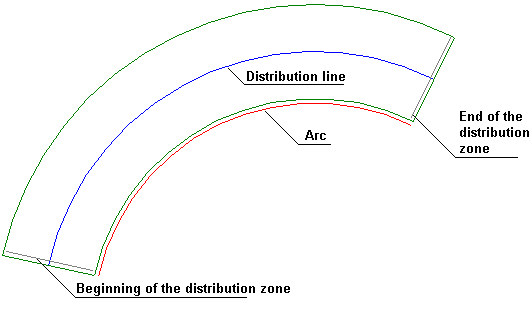
A description of the distribution is an arc-shaped line as for the radial distribution. This line always shows the spacing from the distribution line.
Four types of the line describing this distribution are possible:


First two descriptions are arc-shaped lines, the latter are for straight distributions.
Command line
Select distribution type: [Linear / varying Linearly / Arc / Point] <Arc> :
First point of distribution or [Circle / Select] :
Circle - a circle is selected as a basis for the arc distribution
Select - successive three points belonging to an arc are indicated
Second point of distribution [Side]
Third point of distribution [Side]
Select location of distribution line
Beginning of zone [Side / Cover / N-zones]
End of zone [Back]