The Reinforcement detailing dialog displays after you define the basic parameters of reinforcement distribution. A cover ALWAYS denotes the distance measured from the reinforcement and perpendicular to the distribution line. The zone length is ALWAYS measured along the distribution line.
Click  , to position reinforcing bars in the cross-section in accordance with the principles of projecting and making cross-sections; this way you can determine the side of the bar (beginning or end) on which the selected bar end types are provided.
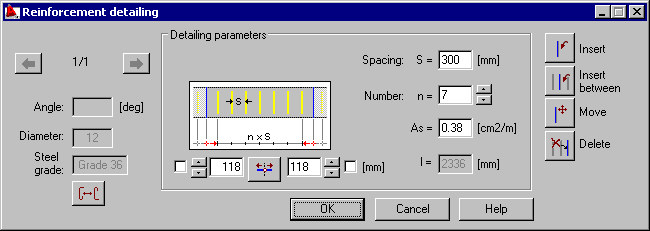
You can define the distribution parameters by:
- Defining the reinforcement spacing in a given zone.
- Specifying a value of the n parameter - it corresponds to the number of reinforcement spacing (Note: Do not confuse this value with the quantity of reinforcement elements which is n+1).
- Specifying the reinforcement area.
Changing any of the parameters listed above will update the values of the remaining parameters.
The schematic drawing in the dialog illustrates the above-mentioned parameters. The options next to the drawing you are used to precisely position the reinforcement distribution in a given zone:
- Use the two edit fields to specify the distance between the extreme reinforcement and the zone border; for extreme zones, the distance value denotes the distance from the extreme bar in the distribution to the zone border, while for middle zones it is the distance between the extreme bars of adjacent zones.
- Use the button between the edit fields to center the distribution.
The following icons are located on the right side of the dialog:
 Insert - inserts a reinforcing bar at the selected location
 Insert between - inserts a reinforcing bar between 2 selected reinforcing bars
 Move - moves a reinforcing bar; you should specify a translation vector
 Delete - deletes a selected reinforcing bar.