The dialog is used to define a printout template for drawings of positions. There are several ways to access this option from:
- Menu: Steel > Edit Drawings > Drawing Template Designer
- Ribbon: ASD - Drawings > Generate Drawings > Drawing Template Designer
- Toolbar: Edit Drawings > Drawing Template Designer

- Command line: RBCS_ADDTEMPLATE.
The following dialog displays:.
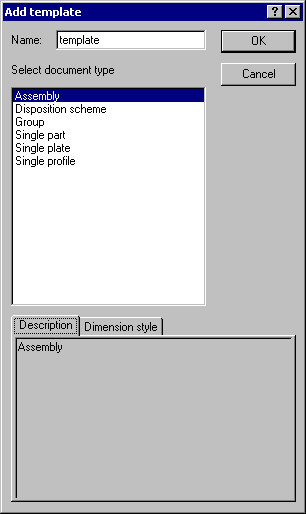
The dialog defines a template for created drawings. For steel, select one of the allowable document types concerned with the position type: assembly, disposition scheme, group, single part, single plate or single profile.
After providing the name of a template and clicking OK, the template is added to the list of available templates located on the Templates tab.
In the bottom of the dialog, the following tabs are included:
- Description (this tab presents description of a selected position type),
- Dimension style (this tab presents available dimension styles for a selected position type).