This tab presents a list of defined positions; the list is sorted by prefixes and numbers.
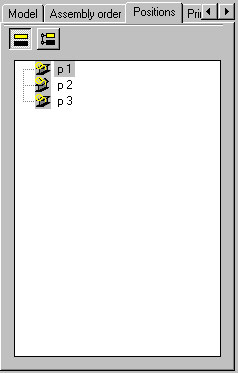
The position types shown below are presented on the list or may be excluded from presentation; the following icons, located in dialog, are used for this purpose:
 - Profiles
 - Plates
 - Assemblies
 - Groups
 - User parts
 - Schemes.
Below are three selection options (Parts, Families, Groups) used to activate a mode of presentation (sorting) of positions.
With the Parts option selected
In this mode elements are shown in one level, grouped by position types in the order as follows (the first order criterion for individual parts is a prefix, the next one is a number), in the alphabetical order of position designations :
- Profiles
- Plates
- Assemblies
- Groups
- User parts
- Schemes
With theFamiliesoption selected
In this mode elements are presented in the form of a tree with the following levels:
- Position type; the order of the items: assemblies, profiles, plates, user parts
- Family (in the alphabetical order)
- Within a family positions are presented in the alphabetical order of designations
With theGroupsoption selected
This mode offers multi-level presentation of elements; it is reflected in this mode which parts are assigned to which assemblies and groups. Positions are presented in the form of a tree with the following levels:
- Position types; the order of the items: groups, assemblies, profiles, plates, user parts, schemes
For the types Groups and Assemblies successive sub-levels are created:
for groups: elements included in a given group
for assemblies: single parts included in a given assembly.
This tab presents a list of all user-defined positions; the structure of positions and documents is shown in a form of a tree (see the drawing below).
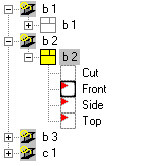
The icon of a document included on the list is presented as follows:
 in yellow - the document is active on the edition layout
  as a red slash - the element of a structure model for which the document has been prepared, has changed
  in gray - the document has been exported to a separate dwg file.
If the icon of a view provided on the list is shown in bold, it is an active view.
The context menu (accessed by right-clicking the Positions tab), includes several options used to perform operations on selected positions:
- Delete - select this command to remove the selected positions from a project
- Select positions - use this command to select all positions
- Attach document - use this command to select a printout template; the template is saved on the Templates tab
- Update documents - select this command to update the documents available for a position
- Delete documents - select this command to delete documents available for a position
- Automatic drawings - select this command to automatically generate drawings for a selected position; after running this command, the Automatic drawing generation dialog displays.