Use this tab of the Object Inspector dialog to manage elements of a project model.
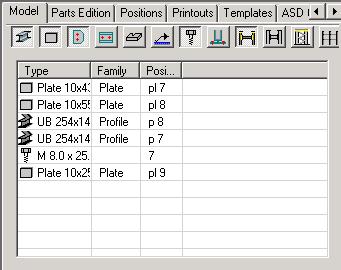
The following model objects defined in a structure are available on this tab:
- Profiles
- Plates
- Subparts
- User parts
- Welds
- Bolts
- Connections
- Groups
- Workframes.
The following icons are located on the dialog box. The object types are presented on a list or may be excluded from presentation of objects.
 - Profiles
 - Plates
 - Subparts (plates)
 - Subparts (profiles)
 - User parts
 - Welds
 - Bolts
 - Connections
 - Groups
 - Workframes.
When elements are selected from the list, they are highlighted in the graphical editor (the selection operation is interactive, all the elements chosen in the Inspector dialog are highlighted in the graphic editor: if an element is selected in the graphic editor, then the selection is also presented in the Inspector dialog).
An object list may be sorted by applying one of the following two methods:
- Double-clicking the table column header (the list can be sorted in ascending or descending order)
- Right-clicking the appropriate option in the context menu.
The context menu (accessed by right-clicking the Model tab), includes several options used to perform operations on selected objects:
- Select all - select this command to select all elements presented on the list
- Deselect all - select this command to cancel the selection of all elements on the list
- Remove - select this command to remove selected elements from a project
- Zoom selection - select this command to zoom-in on the selected elements in a structure view.
- Modify properties - select this command to open the properties dialog (the dialog contents depend on a selected object type); this command is available only when selected elements are of the same type
- Group - select this command to create a group that consists of selected elements; this command is available when several elements are selected
- Add to group - select this command to add a selected element to an existing group
- Remove from group - select this command to remove an indicated element from a selected group
- Change main part of group - select this command to change the main part (main element) in a group; it is necessary to indicate an element that should be the main part of the group
- Ungroup - select this command to split the group into single elements (objects); this command is available only when a group (or several groups) has been selected on the list
- Assign position - select this command to assign a position to selected elements; when this command is activated, the Manual Positioning dialog opens
- Remove position - select this command to remove positions from selected elements
- Auto positioning - select this command to assign positions to selected elements; the Automatic positioning dialog displays.