After clicking  , the following dialog displays:
To define a bar, specify the following:
- Bar diameter (the diameter defined in the dialog is adopted by default)
- Cover of reinforcing bars (the cover defined recently in the dialog box is adopted by default)
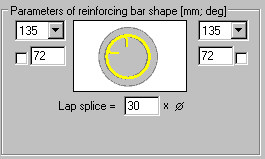
- In the Parameters of reinforcing bar shape field - anchor parameters for reinforcing bar ends, i.e. hook angle, length and lap splice length. You can lock a hook length by selecting the option next to the edit field for defining a hook length (
 appears). The edit field becomes inaccessible; if you modify parameters (length or diameter) of a bar with locked hook length, the hook length does not change.
Standard hook angle values include:
- 0°
- 90°
- 135°
- 180°
- -90°
- -135°
- -180°.
The following icons display in the dialog while a round stirrup is being defined (the remaining icons are unavailable):
 Select - is used to indicate directly the contour formed from a circle or polyline. After selecting, the dialog closes, and the cursor assumes the shape of a square (see the ACAD command ‘copy’ - the phase of selecting the object to be copied). After selecting any point on the screen, the ACAD object is detected and the stirrup is drawn within the indicated object.
  Pick point - is used to search a closed contour by clicking inside the contour. After selecting, the dialog closes, and the cursor assumes the shape of a cross (see the ACAD command ‘copy’ - phase of indicating the beginning and end points). After selecting any point on the screen, the program detects the minimum concave round contour that results from inscribing it in the detected contour. Note: Round stirrups are defined by indicating the following geometrical figures: a regular polygon and a circle - other cases are not supported.
 Points - is used to define a closed contour by specifying a circle center and radius (or diameter).
The definition ALWAYS creates a ROUND stirrup which is inscribed in the indicated contour.
Once the stirrup shape is defined initially, a question displays regarding the points where hooks are to be located.
See also:
Commands from the command line - definition of transversal reinforcement