Use this option to define/modify tables used to prepare the tables of reinforcement in RC structure elements. There are several ways to access this option:
- Menu: Reinforcement > Reinforcement tables > Styles - reinforcement tables
- Ribbon: ASD - Reinforcement > Settings > Styles - reinforcement tables
- Command line: RBCR_LIST_PAR.
After selecting the option, the Reinforcement tables - style manager dialog displays:
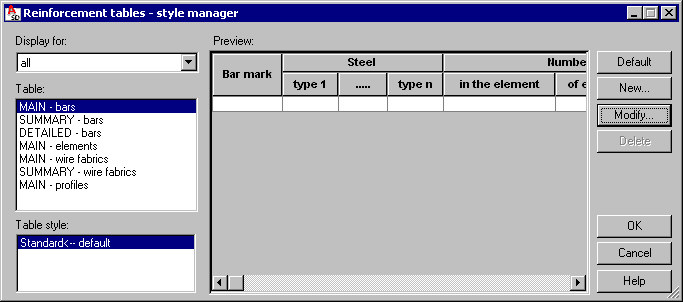
The following types of the reinforcement table are available in the Table field:
- MAIN - reinforcing bars
- SUMMARY - reinforcing bars
- DETAILED - reinforcing bars
- MAIN - elements (see Element manager)
- MAIN - wire fabrics
- SUMMARY - wire fabrics
- MAIN - (steel) profiles.
The individual types of reinforcement tables present the following information:
- MAIN table - it is a global reinforcement table
- SUMMARY table - it is a reinforcement table intended only for the distribution varying linearly (e.g. for stirrups distributed within a tapered beam), to obtain such a table, choose reinforcement distribution varying linearly and select the option Reinforcement table / Summary table
- DETAILED table - it is a summary table concerning the reinforcement steel consumption broken down by bar diameters (see also: Generation of distribution varying linearly and detailed table) - available for distribution varying linearly and bar surface distribution.
For each table type, the standard table style (it is presented in the Table style field) is defined. Once the table type and table style are highlighted, the view of a selected table style is presented in the middle part of the dialog (the Preview field).
The right side of the dialog (apart from the standard buttons OK, Cancel and Help) contains the following buttons:
- Default - click this button to select a style for the default table layout (description style)
- New - click this button to open the Definition of new reinforcement table style dialog where a new style of a selected table type can be defined (based on the style that already exists)
- Modify - click this button to open the Modification of reinforcement table style dialog where changes can be made in a selected table type and table style
- Delete - click this button to delete the highlighted table style from the list of styles available in the Table style field.