How to define a straight bar with anchor element
Click  , the following dialog displays:
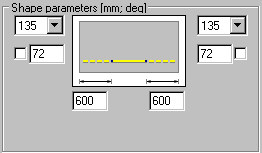
To define a bar, specifiy the following from the dialog:
- Bar diameter (the most recent diameter for this reinforcement type is adopted by default)
- Cover of reinforcing bars (the most recent cover defined for this reinforcement type is adopted by default)
- In the Parameters of reinforcing bar shape field - parameters of anchors for reinforcing bar ends (anchor length or an anchor ended with a hook). You can lock a hook length by selecting the option next to the edit field for the hook length (
 appears); the edit field becomes inaccessible. If you modify parameters (length or diameter) of a bar with a locked hook length, the hook length does not change.
For an anchored bar, the default setting defines the anchor for a straight segment of a bar (hook angle equals zero). You may also define an anchor for a bar with hook of a specified bending angle. Thus three choices are available:
|
1. |

|
anchor: α = 0 l ≠ 0 |
|
2. |

|
hook: α ≠ 0 (by default, the value of 135 degrees is adopted) l = 0 |
|
3. |

|
anchor ended with a hook: α ≠ 0 l ≠ 0 |
The list of standard hook angle values is presented below (see: method of measuring the angle of bar bending):
- 0°
- 90°
- 135°
- 180°
- -90°
- -135°
- -180°.
While a straight bar is being defined, only  (2 Points) is available (the remaining icons are unavailable); indicate the two bar points, and click to start the definition.
After defining the first point determining the bar position, the bar length changes depending on the cursor position.
See also:
Commands from the command line - definition of longitudinal reinforcement