サーフェスを活用する
サーフェスを分割する
UV グリッドを使用してフォームの面を分割することができます。(次の例で示す) DividedSurface.GetReferencesWithDividedSurface()メソッドと DividedSurface.GetDividedSurfaceForReference()メソッドを使用して、分割サーフェスのデータにアクセスしたり、下記のようにフォームの新しく分割サーフェスを作成できます。
|
コード領域 14-7: サーフェスを分割 |
public void DivideSurface(Document document, Form form)
{
    Autodesk.Revit.ApplicationServices.Application application = document.Application;
    Options opt = application.Create.NewGeometryOptions();
    opt.ComputeReferences = true;

    Autodesk.Revit.DB.GeometryElement geomElem = form.get_Geometry(opt);
    foreach (GeometryObject geomObj in geomElem)
    {
        Solid solid = geomObj as Solid;
        foreach (Face face in solid.Faces)
        {
            if (face.Reference != null)
            {
                DividedSurface ds = DividedSurface.Create(document,face.Reference);
                // create a divided surface with fixed number of U and V grid lines
                SpacingRule srU = ds.USpacingRule;
                srU.SetLayoutFixedNumber(16, SpacingRuleJustification.Center, 0, 0);

                SpacingRule srV = ds.VSpacingRule;
                srV.SetLayoutFixedNumber(24, SpacingRuleJustification.Center, 0, 0);

                break;  // just divide one face of form
            }
        }
    }
}
|
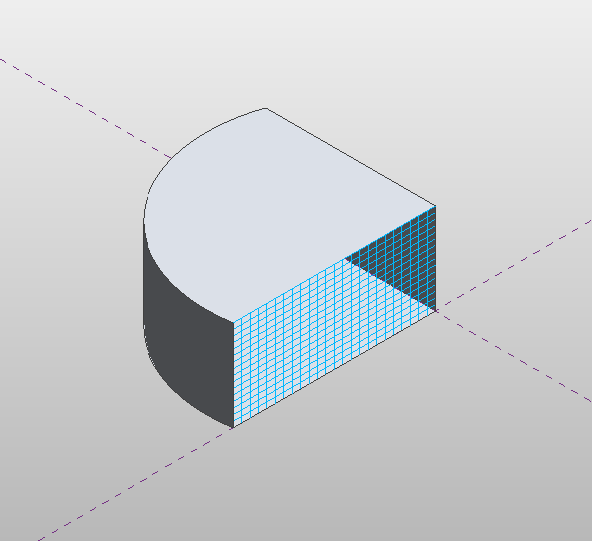
図 60: UV グリッドで分割されたフォームの面
DividedSurface の USpacing および VSpacing プロパティにアクセスすると、グリッドの固定数(上の例を参照)、グリッド間の固定距離、グリッド間の最小または最大間隔のいずれかを指定して、U および V グリッドラインの SpacingRule を定義できます。位置合わせおよびグリッドの回転などの各間隔規則には、追加情報が必要です。
サーフェスをパターン化する
分割されたサーフェスはパターン化することができます。任意の組み込みのタイル パターンを分割サーフェスに適用することができます。タイル パターンは、DividedSurface に割り当てられている ElementType です。タイル パターンは UV グリッド レイアウトに従ってサーフェスに適用されるため、DividedSurface の USpacing および VSpacing プロパティを変更すると、パターン化されたサーフェスの表示方法に影響を与えます。
次の例は、OctagonRotate パターンを使用して分割サーフェスをカバーする方法を示しています。これに対応する図は、前の例の分割サーフェスに適用されたときにどのように見えるかを示します。注 この例では、フォームで DividedSurface を取得する方法も示します。
|
コードの領域 14-8: サーフェスをパターン化 |
public void TileSurface(Document document, Form form)
{
    // cover surface with OctagonRotate tile pattern
    TilePatterns tilePatterns = document.Settings.TilePatterns;
    foreach (Reference r in DividedSurface.GetReferencesWithDividedSurfaces(form))
    {
        DividedSurface ds = DividedSurface.GetDividedSurfaceForReference(document, r);
        ds.ChangeTypeId(tilePatterns.GetTilePattern(TilePatternsBuiltIn.OctagonRotate).Id);
    }
}
|
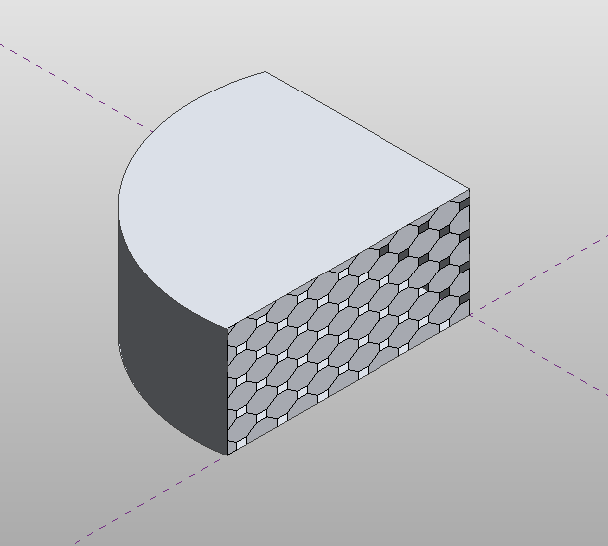
図 61: 分割サーフェスに適用されたタイル パターン
分割サーフェスに組み込みタイル パターンを適用するのに加えて、「Curtain Panel Pattern Based.rft」テンプレートを使用して、独自のマス パネル ファミリを作成できます。これらのパネル ファミリは、マス ファミリにロードしたり、DividedSurface.ChangeTypeId()メソッドを使用して分割サーフェスに適用できます。
Family の以下のプロパティが、カーテン パネル ファミリに固有のものです。
- IsCurtainPanelFamily
- CurtainPanelHorizontalSpacing - メッシュ処理の水平間隔
- CurtainPanelVerticalSpacing - メッシュ処理の垂直間隔
- CurtainPanelTilePattern - タイル パターンの選択
次の例では、コンセプト マス ドキュメントのフォームに適用できるマス パネル ファミリを編集する方法を示しています。この例を実行するには、まず「Curtain Panel Pattern Based.rft」テンプレートを使用して、新しいファミリ ドキュメントを作成します。
|
コード領域 14-9: カーテン パネル ファミリを編集 |
Family family = document.OwnerFamily;
if (family.IsCurtainPanelFamily == true &&
    family.CurtainPanelTilePattern == TilePatternsBuiltIn.Rectangle)
{
    // first change spacing of grids in family document
    family.CurtainPanelHorizontalSpacing = 20;
    family.CurtainPanelVerticalSpacing = 30;

    // create new points and lines on grid
    Autodesk.Revit.ApplicationServices.Application app = document.Application;
    FilteredElementCollector collector = new FilteredElementCollector(document);
    ICollection<Element> collection = collector.OfClass(typeof(ReferencePoint)).ToElements();
    int ctr = 0;
    ReferencePoint rp0 = null, rp1 = null, rp2 = null, rp3 = null;
    foreach (Autodesk.Revit.DB.Element e in collection)
    {
        ReferencePoint rp = e as ReferencePoint;
        switch (ctr)
        {
            case 0:
                rp0 = rp;
                break;
            case 1:
                rp1 = rp;
                break;
            case 2:
                rp2 = rp;
                break;
            case 3:
                rp3 = rp;
                break;
        }
        ctr++;
    }

    ReferencePointArray rpAr = new ReferencePointArray();
    rpAr.Append(rp0);
    rpAr.Append(rp2);
    CurveByPoints curve1 = document.FamilyCreate.NewCurveByPoints(rpAr);
    PointLocationOnCurve pointLocationOnCurve25 = new PointLocationOnCurve(PointOnCurveMeasurementType.NormalizedCurveParameter, 0.25, PointOnCurveMeasureFrom.Beginning);
    PointOnEdge poeA = app.Create.NewPointOnEdge(curve1.GeometryCurve.Reference, pointLocationOnCurve25);
    ReferencePoint rpA = document.FamilyCreate.NewReferencePoint(poeA);
    PointLocationOnCurve pointLocationOnCurve75 = new PointLocationOnCurve(PointOnCurveMeasurementType.NormalizedCurveParameter, 0.75, PointOnCurveMeasureFrom.Beginning);
    PointOnEdge poeB = app.Create.NewPointOnEdge(curve1.GeometryCurve.Reference, pointLocationOnCurve75);
    ReferencePoint rpB = document.FamilyCreate.NewReferencePoint(poeB);

    rpAr.Clear();
    rpAr.Append(rp1);
    rpAr.Append(rp3);
    CurveByPoints curve2 = document.FamilyCreate.NewCurveByPoints(rpAr);
    PointOnEdge poeC = app.Create.NewPointOnEdge(curve2.GeometryCurve.Reference, pointLocationOnCurve25);
    ReferencePoint rpC = document.FamilyCreate.NewReferencePoint(poeC);
    PointOnEdge poeD = app.Create.NewPointOnEdge(curve2.GeometryCurve.Reference, pointLocationOnCurve75);
    ReferencePoint rpD = document.FamilyCreate.NewReferencePoint(poeD);
}
else
{
    throw new Exception("Please open a curtain family document before calling this command.");
}
|
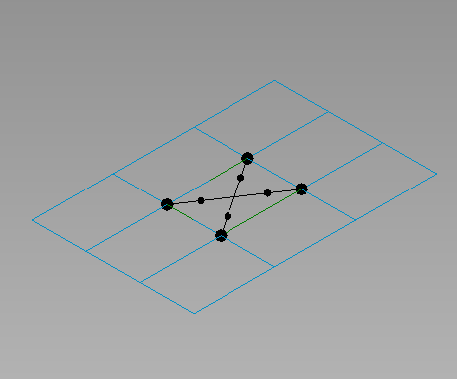
図 62: カーテン パネル ファミリ
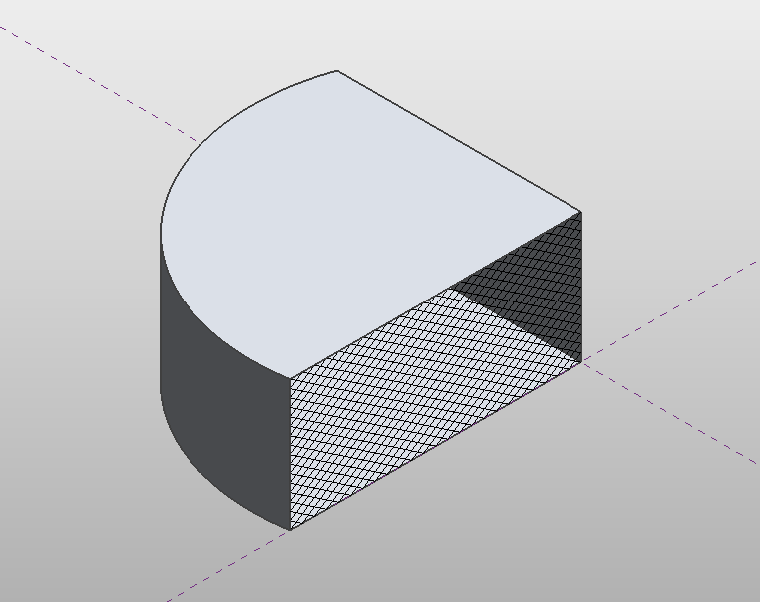
図 63: 分割サーフェスに割り当てられたカーテン パネル