開口部
Revit プラットフォーム API では、開口部オブジェクトは Element オブジェクトから派生したものであり、Element オブジェクト プロパティとメソッドのすべてが含まれています。プロジェクト内のすべての開口部を取得するには、Document.ElementIterator を使用して Elements.Opening オブジェクトを検索します。
一般的なプロパティ
このセクションでは、開口部プロパティを使用する方法について説明します。
- IsRectBoundary - 開口部が長方形の境界を持つかどうかを識別します。
- true の場合、開口部は矩形状の境界を持ち、開口部 BoundaryRect プロパティから IList<XYZ> コレクションを取得することができます。そうでない場合、プロパティは null を返します。
- False の場合、BoundaryCurves プロパティから CurveArray オブジェクトを取得できます。
- BoundaryCurves - 開口部の境界が長方形でない場合は、このプロパティがジオメトリ情報を取得します。長方形の場合は null を返します。このプロパティは、開口部オブジェクトの境界を表す曲線を含む CurveArray オブジェクトを返します。
曲線の詳細は、「ジオメトリ」を参照してください。
- BoundaryRect - 開口部の境界が長方形の場合は、このプロパティを使用してジオメトリ情報を取得することができます。長方形でない場合は null を返します。
- プロパティは、XYZ 座標を含む IList<XYZ> コレクションを返します。
- IList<XYZ> コレクションは通常、長方形の境界の最小値(左下)と最大値(右上)の座標を持ちます。
- Host - ホスト プロパティは開口部のホスト要素を取得します。ホスト要素は、開口部オブジェクトにより切り取られる要素です。 注: 開口部オブジェクトのカテゴリがシャフト開口部の場合、開口部ホストは null となります。
次の例は、既存の開口部プロパティを取得する方法を示します。
|
コード領域 11-6: 既存の開口部プロパティを取得 |
private void Getinfo_Opening(Opening opening)
{
    string message = "Opening:";

    //get the host element of this opening
    message += "\nThe id of the opening's host element is : " + opening.Host.Id.IntegerValue;

    //get the information whether the opening has a rect boundary
    //If the opening has a rect boundary, we can get the geometry information from BoundaryRect property.
    //Otherwise we should get the geometry information from BoundaryCurves property
    if (opening.IsRectBoundary)
    {
        message += "\nThe opening has a rectangular boundary.";
        //array contains two XYZ objects: the max and min coords of boundary
        IList<XYZ> boundaryRect = opening.BoundaryRect;

        //get the coordinate value of the min coordinate point
        XYZ point = opening.BoundaryRect[0];
        message += "\nMin coordinate point:(" + point.X + ", "
                                + point.Y + ", " + point.Z + ")";

        //get the coordinate value of the Max coordinate point
        point = opening.BoundaryRect[1];
        message += "\nMax coordinate point: (" + point.X + ", "
                                + point.Y + ", " + point.Z + ")";
    }
    else
    {
        message += "\nThe opening doesn't have a rectangular boundary.";
        // Get curve number
        int curves = opening.BoundaryCurves.Size;
        message += "\nNumber of curves is : " + curves;
        for (int i = 0; i < curves; i++)
        {
            Autodesk.Revit.DB.Curve curve = opening.BoundaryCurves.get_Item(i);
            // Get curve start point
            message += "\nCurve start point: " + XYZToString(curve.GetEndPoint(0));
            // Get curve end point
            message += "; Curve end point: " + XYZToString(curve.GetEndPoint(1));
        }
    }
    TaskDialog.Show("Revit",message);
}

// output the point's three coordinates
string XYZToString(XYZ point)
{
    return "(" + point.X + ", " + point.Y + ", " + point.Z + ")";
}
|
開口部を作成する
Revit プラットフォーム API で、プロジェクトに開口部を作成するには、Document.NewOpening()メソッドを使用します。さまざまなホスト要素に開口部を作成するために使用できる、4 つのメソッド オーバーロードがあります。
|
コード領域 11-7: NewOpening() |
//Create a new Opening in a beam, brace and column. public Opening NewOpening(Element famInstElement, CurveArray profile, eRefFace iFace); |
//Create a new Opening in a roof, floor and ceiling. public Opening NewOpening(Element hostElement, CurveArray profile, bool bPerpendicularFace); |
//Create a new Opening Element. public Opening NewOpening(Level bottomLevel, Level topLevel, CurveArray profile); |
//Create an opening in a straight wall or arc wall. public Opening NewOpening(Wall, XYZ pntStart, XYZ pntEnd); |
- 梁、ブレース、柱に開口部を作成する - ファミリ インスタンスに開口部を作成するために使用します。iFace パラメータは開口部を配置する面を示します。
- 屋根、床、天井開口部を作成する - 屋根、床、天井に開口部を作成するために使用します。
- bPerpendicularFace パラメータは開口部が面の垂線になっているか、つまり垂直かどうかを示します。
- パラメータが True の場合は、開口部はホスト要素の面に対して垂直になります。次の図を参照してください。
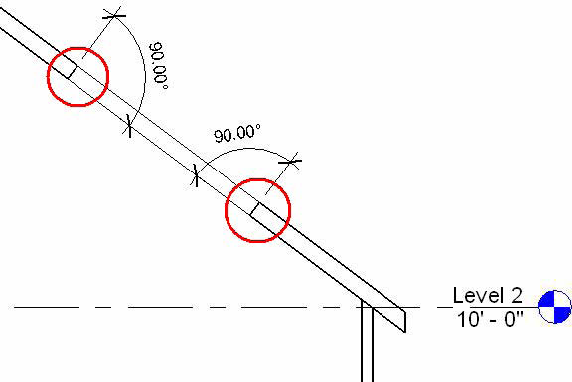
図 39: ホスト要素の面に垂直な開口部の切り取り
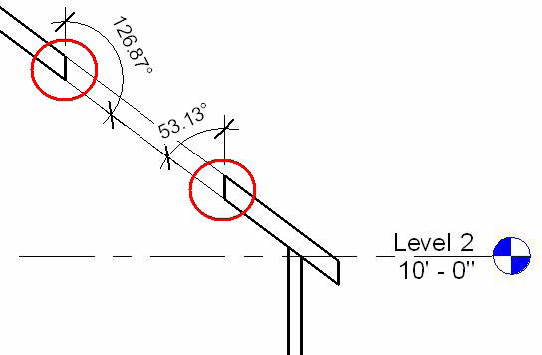
図 40: ホスト要素に垂直な開口部の切り取り
- 新しい開口部要素を作成する - プロジェクトにシャフト開口部を作成するために使用します。ただし、topLevel が bottomLevel よりも高くなっていることを確認してください。高くなっていない場合は例外が発生します。
- 直線の壁または円弧壁に開口部を作成する - 壁に長方形の開口部を作成するために使用します。pntStart と pntEnd の座標は、長方形を形成するコーナーの座標になります。たとえば、長方形の左下のコーナーと右上のコーナーです。それ以外の場合は、例外が発生します。
注: [開口部]コマンドを使用すると、長方形の形状の壁の開口部のみを作成することができます。壁に穴を作成する場合は、[開口部]コマンドの代わりに壁のプロファイルを編集します。