Auxiliary Intersection
尋找兩個幾何圖形元素明確或隱含的交點。輔助交點不是次組合幾何圖形的一部分,但可以從中建立其他幾何圖形。
Properties
在「Properties」面板中指定下列參數。
| Point | |
| Point Number | 指定點編號。您可以變更自動產生的「Point Number」值。 |
| Point Geometry Type | |
| Type | 指定交點的定義參數:
|
| Geometry Properties (Two Links) | |
| Link 1 | 指定交叉的第一個連接。 |
| Link 2 | 指定交叉的第二個連接。 |
| Extend Link 1 | 如果沒有直接交叉,則延伸「Link 1」以尋找與「Link 2」的明顯交叉。 |
| Extend Link 2 | 如果沒有直接交叉,則延伸「Link 2」以尋找與「Link 1」的明顯交叉。 |
| Geometry Properties (Link and Point Slope) | |
| Link | 指定交叉的連接。 |
| Point | 根據「Slope」值指定點,以從該點交叉。 |
| Extend Link | 如果沒有直接交叉,則延「Link」以尋找與自該「Point」的「Slope」明顯的交叉。 |
| Slope | 指定相對於該「Point」的坡度值 (%)。 按一下 [...] 以開啟「Expression Editor」,您可以在其中輸入或計算值。 |
| Extend Slope | 如果沒有直接交叉,則延伸「Slope」以尋找與「Link」的明顯交叉。 |
| Reverse Slope | 反轉「Slope」值。 |
| Geometry Properties (Two Point Slopes) | |
| Point 1 | 指定第一個點。 |
| Slope 1 | 指定相對於「Point 1」的坡度值 (%)。 按一下 [...] 以開啟「Expression Editor」,您可以在其中輸入或計算值。 |
| Point 2 | 指定第二個點。 |
| Slope 2 | 指定相對於「Point 2」的坡度值 (%)。 按一下 [...] 以開啟「Expression Editor」,您可以在其中輸入或計算值。 |
| Extend Slope 1 | 如果沒有直接交叉,則延伸「Slope 1」以尋找與「Slope 2」的明顯交叉。 |
| Extend Slope 2 | 如果沒有直接交叉,則延伸「Slope 2」以尋找與「Slope 1」的明顯交叉。 |
| Reverse Slope 1 | 反轉「Slope 1」的值。 |
| Reverse Slope 2 | 反轉「Slope 2」的值。 |
| Miscellaneous | |
| Comment | 指示關於點的注意事項。註解可以顯示在「Preview」面板中。 |
| Show Errors | 在「Error Center」頁籤上顯示關於元素的訊息。 |
範例
若要查看如何使用此幾何圖形元素的範例,請開啟以下範例 PKT 檔:
Auxiliary Intersection Example.pkt
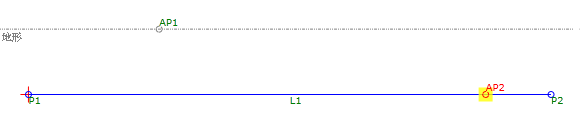
在此範例中,Auxiliary Intersection (AP2) 的相交處建立的 L1 和指定的坡度從 AP1。延伸並反轉坡度。