New Design Workspace
With more and more people using 3ds Max to create impressive visualizations, we are introducing the new Design Workspace that brings more efficient workflows to 3ds Max users. The Design Workspace follows a task-based logical system with easy access to object placement, lighting, rendering, modeling, and texturing tools in 3ds Max. Importing design data to quickly create high-quality stills and animation is now easier.

New Template System
New on-demand templates provide users with standardized start-up configurations, which help accelerate the scene creation process. With easy import/export options, users can quickly share templates across teams. Users also have the ability to create new templates or modify existing templates, custom-tailoring them for individual workflows. Built-in settings for rendering, environments, lighting, and units mean faster, more accurate 3ds Max project results.

Multi-Touch Support
3ds Max 2016 now features multi-touch 3D navigation, giving artists even more freedom when interacting with their 3D content. Supported devices are the Wacom® Intuos 5 touch tablet, Cintiq 24HD and Cintiq Companion, as well as touch-enabled Windows 8 devices. These devices enable natural interactions using a pen in one hand, while the other hand simultaneously performs multi-finger gestures to orbit, pan, zoom, or roll the scene.
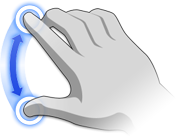

Gestures for zooming and panning
Workflow Improvements
3ds Max 2016 is packed with workflow improvements across different areas: Enhancements to the ShaderFX real-time visual shader editor offer expanded shading options and better shader interoperability between 3ds Max, Maya, and Maya LT so that artists and programmers can create and exchange advanced shaders more easily. Working with complex scenes is now easier thanks to increased performance and stability improvements in the Scene Explorer and improvements in the Layer Manager. Enhancements to the Nitrous viewport provide improvements in performance and visual quality.
Small User-Requested Features: "SURFs"
With the understanding that small things can make a big difference, 3ds Max 2016 addresses up to 10 workflow obstacles identified as high priority by customers. Among these are a new Viewport Selection Preview, Cut Tool Improvements, and the ability to visualize hard and smooth edges. Customers can suggest features and vote on current suggestions using the User Voice forum.