Connections can be created and edited with the Advance Steel API.
Joints, or connections, are represented in the API by the UserAutoConstructionObject class. Creating a UserAutoConstructionObject is similar to adding a joint by selecting a connection type in the Connection Vault in the Advance Steel UI. The properties for the connection can be set using the Filer class.
Creating Joints
Create a new Advance Steel add-in project as in previous walkthroughs. Create a new class called Joints and add the following method which creates two beams and a moment connection between them.
|
Code Region: Create Joint and change parameters |
[CommandMethodAttribute("TEST_GROUP", "CreateJoints", "CreateJoints", CommandFlags.Modal | CommandFlags.UsePickSet | CommandFlags.Redraw)]
public void CreateJointChangeParamsAndUpdate()
{
    //Lock dock and start transaction
    DocumentManager.lockCurrentDocument();
    TransactionManager.startTransaction();

    Beam beam1 = null;
    Beam beam2 = null;
    UserAutoConstructionObject joint = null;

    Point3d pt1 = new Point3d();
    Point3d pt2 = new Point3d();

    pt1.Set(0, 0, 0);
    pt2.Set(1000, 0, 0);

    beam1 = new StraightBeam("HEA  DIN18800-1#@§@#HEA100", pt1, pt2, new Vector3d(0, 0, 1));
    beam1.WriteToDb();

    pt1.Set(500, 0, 00);
    pt2.Set(500, 1000, 0);

    beam2 = new StraightBeam("HEA  DIN18800-1#@§@#HEA100", pt1, pt2, new Vector3d(0, 0, 1));
    beam2.WriteToDb();

    Dictionary<FilerObject, Point3d> inputInformation = new Dictionary<FilerObject, Point3d>();

    inputInformation.Add(beam1, beam1.CenterPoint);
    inputInformation.Add(beam2, beam2.CenterPoint);

    joint = new UserAutoConstructionObject("MomentConnBeam2Beam", inputInformation);

    if (joint != null)
    {
        Filer filer = joint.Save();

        filer.WriteItem(0.0, "InnerWebCut");
        filer.WriteItem(1, "CutToFace");
        filer.WriteItem(50.0, "CutBack");

        joint.Load(filer);
        joint.Update();
    }

    //Unlock doc and end transaction
    TransactionManager.endTransaction();
    DocumentManager.unlockCurrentDocument();
}
|
Note that just as with the UI command, the connection requires a list of elements to be connected. In this case, a list of beams is used in the UserAutoConstructionObject constructor. The type of connection created is based on the string value used in the constructor. In this case, the code will create a Moment Connection.
Once the joint is created, the UserAutoConstructionObject.Save() method will return a Filer object which can be used to set various parameters for the joint. Filer.WriteItem() specifies a value with a named parameter. These correspond to the properties that can be defined for a new connection in the UI. Once the parameters are specified, use UserAutoConstructionObject.Load() to load the Filer back into the joint with the parameters defined and call UserAutoConstructionObject.Update() to update the joint in the database.
Joint type names and parameter names
Looking at the code above, you will see that the type of connection is specified in the UserAutoConstructionObject as a string, in this case "MomentConnBeam2Beam". The joint parameters are also defined using a string name, such as "InnerWebCut". These names for the joints and the parameters match closely with the corresponding connection names and parameter names in the UI, and from the names, it is easy to identify which connection or parameter they reference.
|
Code Region: Reading joint names and parameters |
[CommandMethodAttribute("TEST_GROUP", "ReadJoints", "ReadJoints", CommandFlags.Modal | CommandFlags.UsePickSet | CommandFlags.Redraw)]
public void ReadJoints()
{
    // Get all the joints from the database
    Autodesk.AdvanceSteel.CADLink.Database.ObjectId[] ids;
    ClassTypeFilter filter = new ClassTypeFilter();
    filter.AppendAcceptedClass(FilerObject.eObjectType.kUserAutoConstructionObject);

    DatabaseManager.GetModelObjectIds(out ids, filter);

    // for each joint, get the name and a list of parameters associated with that joint
    // and write the data to the debug window
    foreach (Autodesk.AdvanceSteel.CADLink.Database.ObjectId id in ids)
    {
        FilerObject obj = DatabaseManager.Open(id);
        UserAutoConstructionObject joint = obj as UserAutoConstructionObject;
        if (joint != null)
        {
            System.Diagnostics.Debug.WriteLine(String.Format("Joint type: {0}", joint.NewRuleTypeRunName));
            System.Diagnostics.Debug.Indent();
            Filer filer = joint.Save();
            Dictionary<string, object> filerData = filer.GetItems();
            Dictionary<string, object>.KeyCollection keyColl = filerData.Keys;

            // iterate all the parameters for the joint and write them out
            foreach (string s in keyColl)
            {
                System.Diagnostics.Debug.WriteLine(s);
            }
            System.Diagnostics.Debug.WriteLine("");
            System.Diagnostics.Debug.Unindent();
        }
    }
}
|
The method above will get all the joints in the file from the DatabaseManager, then iterate through them, writing out the name and parameters to the debug window. You will see something like this:
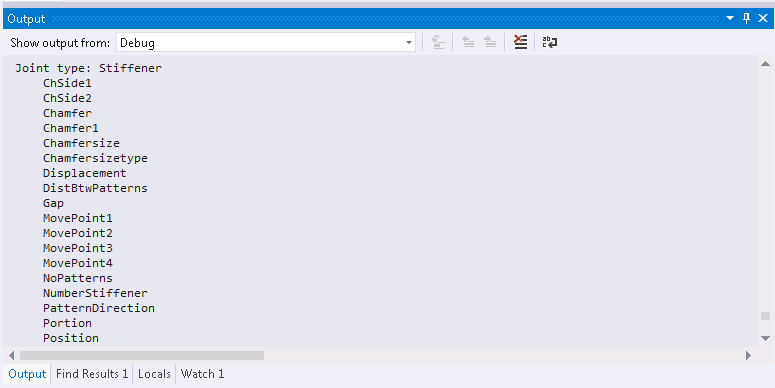
The name after "Joint type:" will be the string to use for the UserAutoConstructionObject constructor and the list of parameters that follows are the strings to use with the Filer.WriteItem() method.