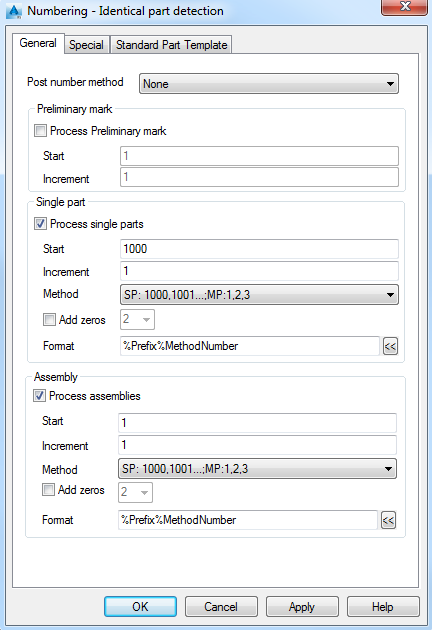
Post number method
Several numbering options are available. These settings influence the single part marks of the assembly. The numbering runs first the single part detection, then the assembly part detection. If there is a setting for the Post numbering method, then there is an additional iteration to equal the single part marks to the assembly marks according to the settings.
None
No special settings. The numbering runs the single part detection, then assembly part detection or both, according to the selection.
Assembly group
This setting assigns the single part marks relative to the assembly part. The single part mark will include the assembly number and refers to the assembly where it was first detailed. For example, an attached plate of Column C1 gets the part mark pa-C1.
Important: First detail the assembly parts and then the single parts.
SP No (for main part) = Assembly No
Assigns the same mark for the single part mark and assembly mark of the main assembly piece. For example, the biggest piece in an assembly is the main piece; this piece will get the same number information for the single part and assembly.
With this option the single part numbering and the assembly numbering must be done at the same time. Advance Steel forces this by disabling the other check boxes. Once a numbering has been performed, it is not possible to change this option unless the Ungroup identical parts tool is used, which completely removes any numbering information.
SP No (for standalone part) = Assembly No
The single part mark for the standalone parts is assigned the same value as the assembly mark instead of having an individual single part mark.
This applies only to the standalone pieces, not to other assembly pieces.
Preliminary mark
Controls the preliminary numbering options.
Process preliminary mark
Turns on/off the preliminary numbering. Preliminary marks are assigned during the design process and never change during the entire project.
Start
Defines the start value for the preliminary numbering.
Increment
Defines the increment for the single parts numbering.
Single part
Controls the single part numbering options.
Process single parts
Turns on/off the single part numbering.
Start
Defines the lowest number that will be used for the single part numbering. By default, single parts marks begin with 1000 and increase by increments of 1.
Increment
Defines the increment for the single parts numbering.
Method
Select one of the available numbering methods.
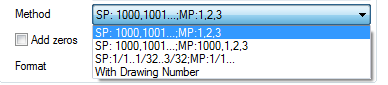
The first three numbering methods assign fixed numbers to the objects. There will be no link between the assigned element number and the drawing the piece is detailed on.
- SP: 1000, 10001, ...; MP: 1,2,3: The Single parts and the Main parts are numbered starting with the defined value.
- SP: 1000, 10001, ...; MP: 1000, 1,2,3: The Single parts and the Main parts are numbered starting with the defined value. The standalone parts are numbered using same numbering rule defined for the Single parts.
- SP: 1/1 ..1/32..3/32;MP:1/1..: The Single parts and the Main part mark contains the number of identical parts. Example
- With drawing number: Assigns an internal number to each object. During the detail creation, the internal number will be changed to the drawing number the element is detailed on. At drawing creation, the first part gets the prefix a001, then b001, etc.
Assembly
Controls the assembly numbering options.
Process assemblies
Turns on/off the assembly numbering.
Start
Defines the lowest number that will be used for the assembly numbering. By default, single parts marks begin with 1 and increase by increments of 1.
Increment
Defines the increment for the assembly numbering.